

Case Study
Unifying signup raised completion
from 54% to 64%
How I replaced seventeen separate signup entry points at Vedantu with one journey across app and web, tested the team's assumption about what drives completion, and rolled the new flow out to millions of existing accounts without asking any of them to start again.
- My Role
- Product Designer
- Platforms
- App & Website
- Scope
- Sign-up Flow
- Year
- 2024-25
Vedantu · Sign-up flow · 2024–25
Sign-up flow
Revamp
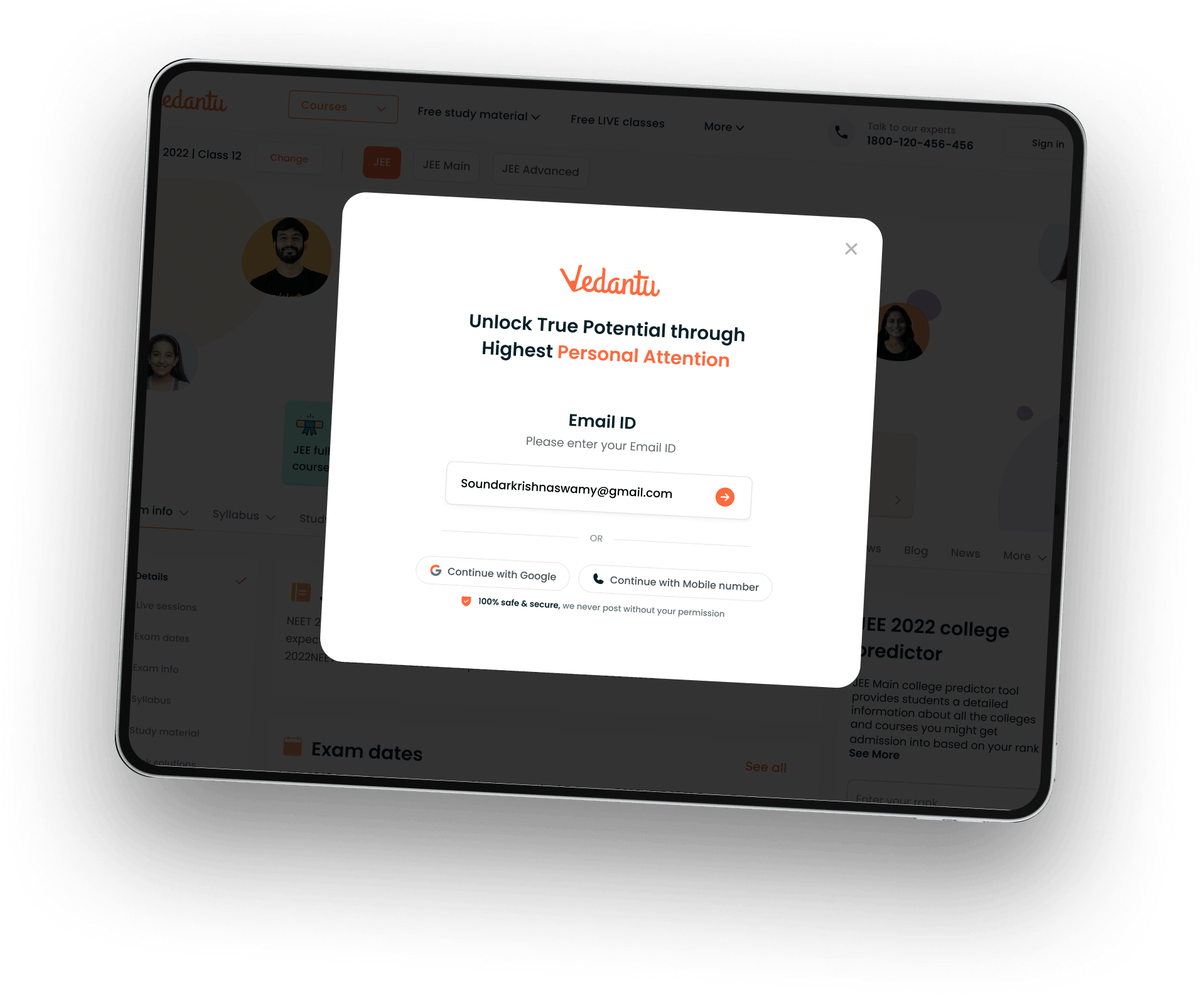
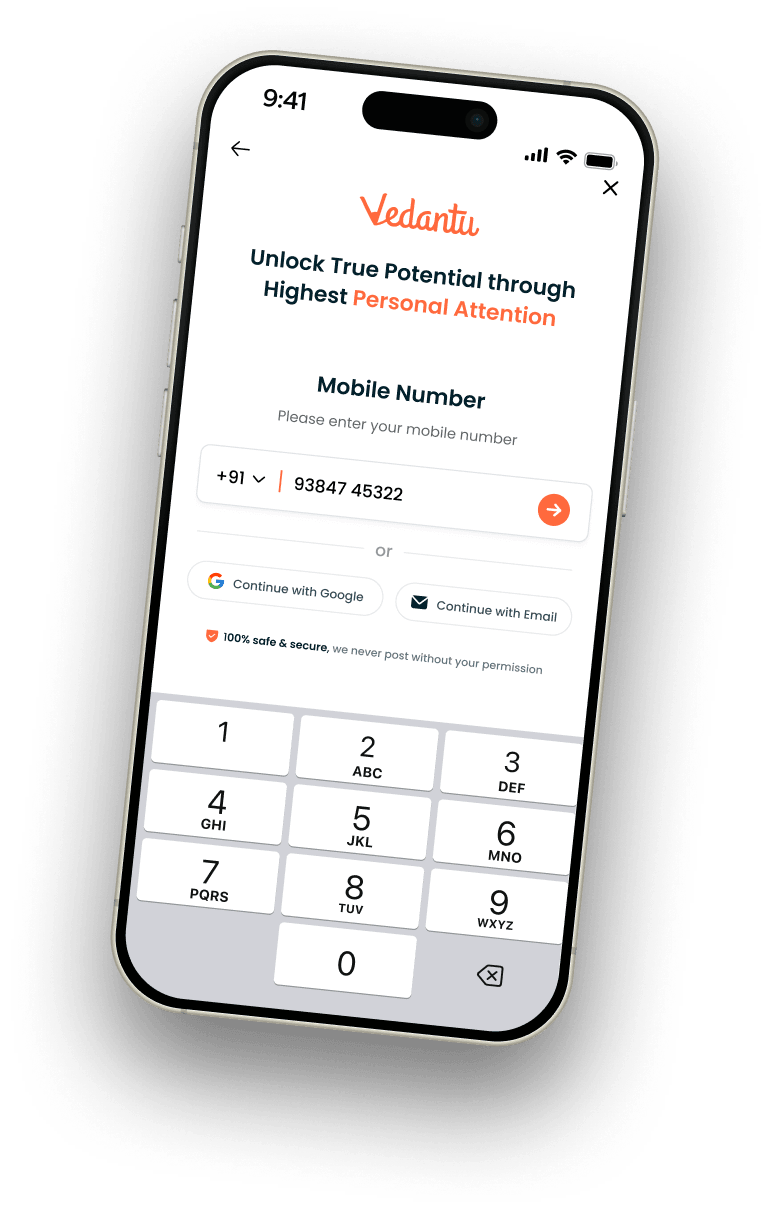
one journey for app & web

Impact
What it set out to moveNumbers
54 → 64%
of verified users completed signup: the step-by-step flow against the shorter one, tested on the same pages
38→49%
completed the full journey, from entering a phone number to finishing signup
99.9% Users
of existing users carried on as normal, with nothing to redo
Context
Whatthe projectwas, and where I sat in it.
Vedantu is an online learning platform for school students in India, sold through a mix of live classes, recorded courses and offline centres. Almost everything the business does after a student arrives depends on four details: which grade they are in, which board they follow, which exam they are preparing for, and where they live. Those details decide which courses appear, which counsellor calls them, and which centre is offered.
By early 2024 those four details were being collected in at least five different ways. Signup had been added to the product repeatedly, page by page and campaign by campaign, and each addition had been reasonable on its own. Together they had produced a system where the same student could be recorded three different ways depending on the page they happened to land on.
I was the only designer on the project, from the first audit to the rollout. I worked with one product manager, one analyst, and the app and web engineering teams. The flow went live on the app on 18 September 2024 and on the web on 25 September 2024.
I audited the existing flows
I went through all seventeen entry points across app and web and recorded what each one asked for, in what order, and with what wording. The comparison table further down is my audit, unchanged.
I defined the shared question set
I proposed the single list of signup details, and the fixed set of allowed answers for each, and agreed it with the product manager and the engineering leads so both platforms could write to one record.
I designed the flow
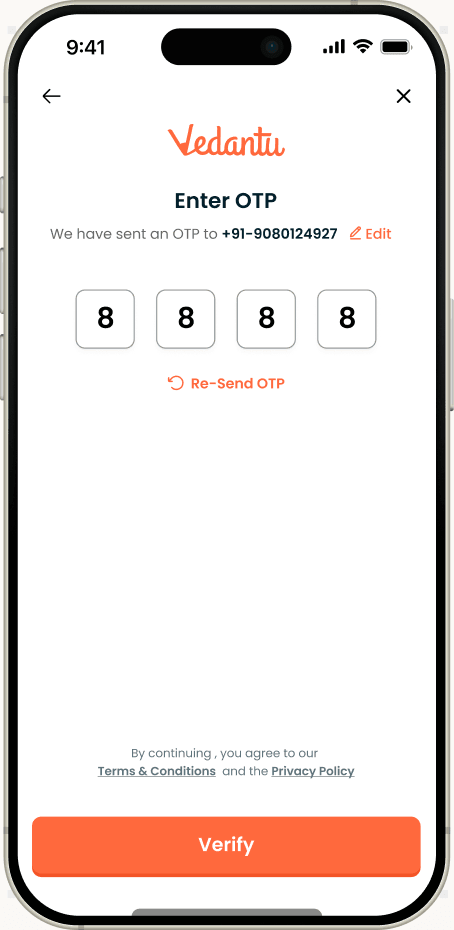
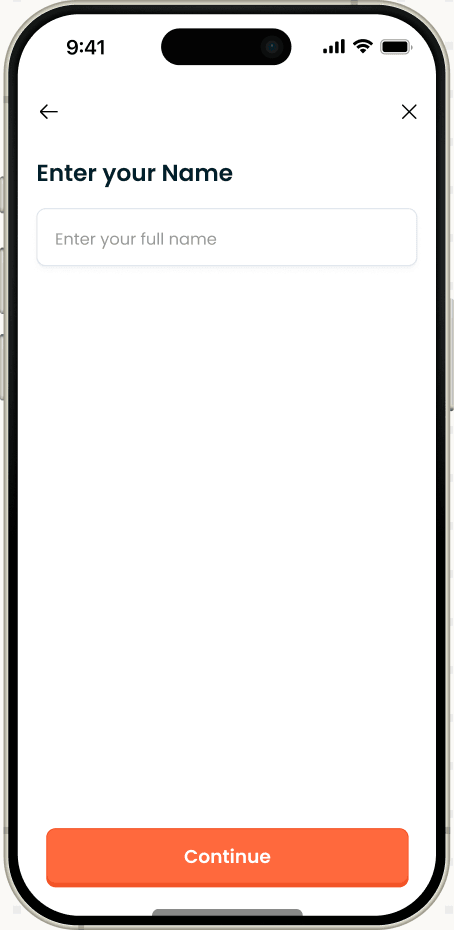
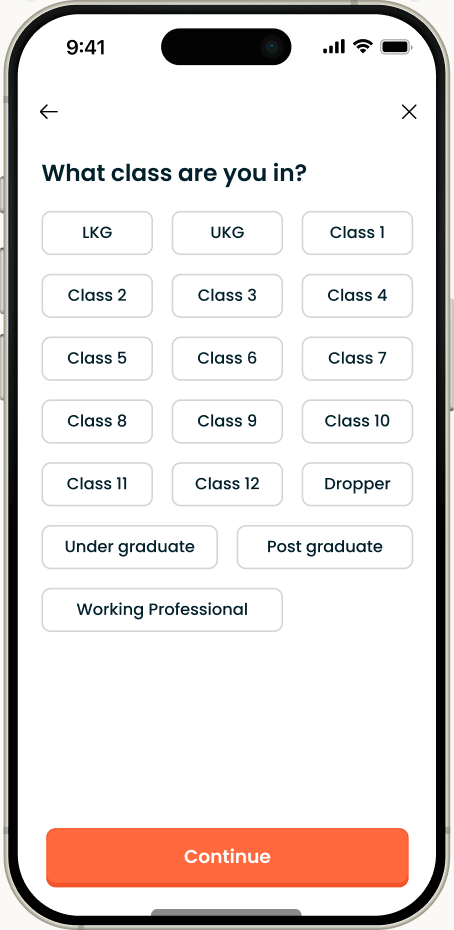
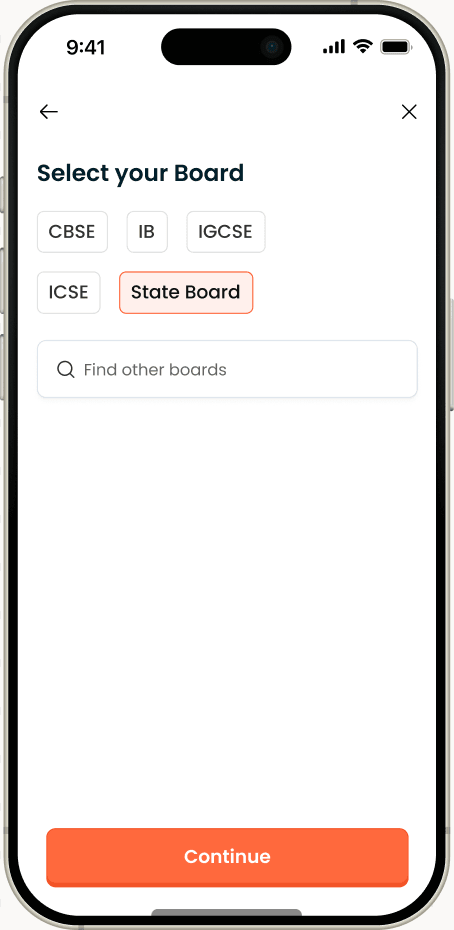
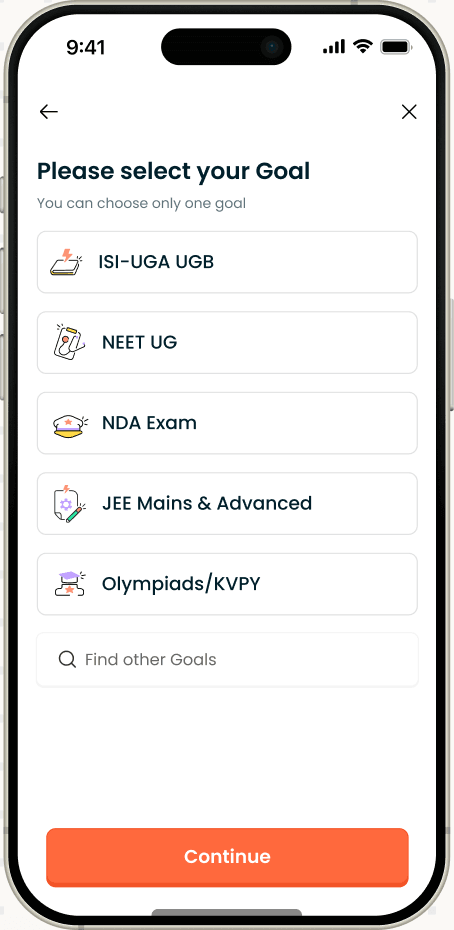
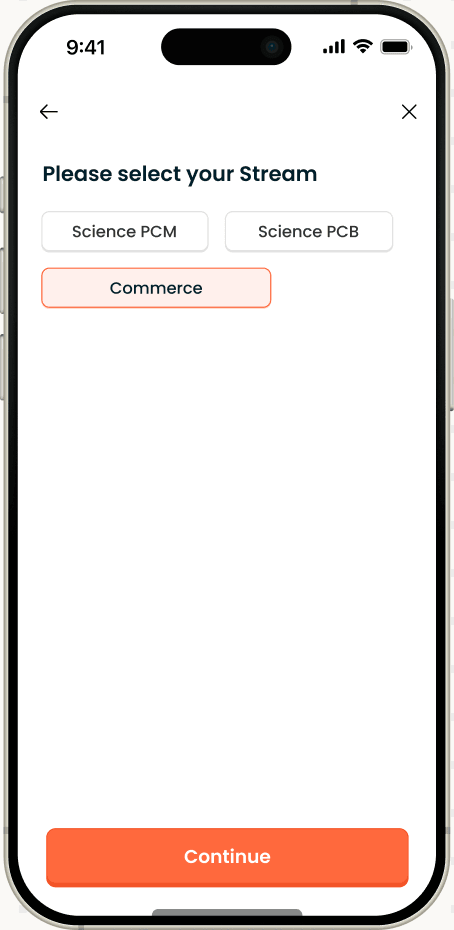
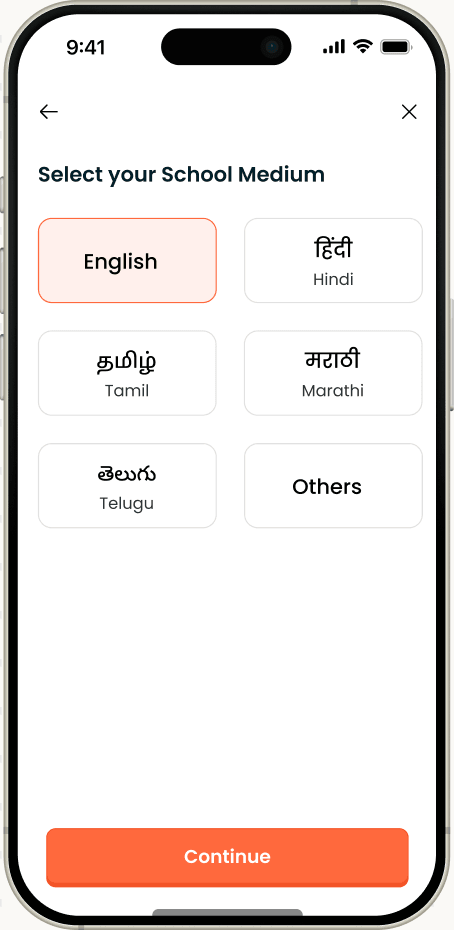
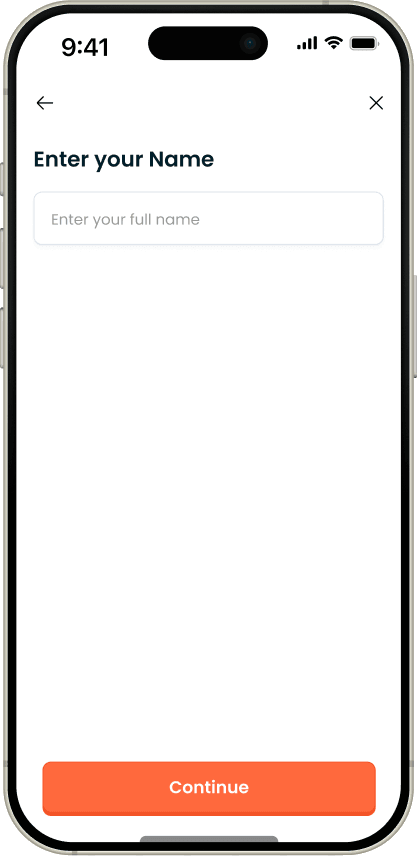
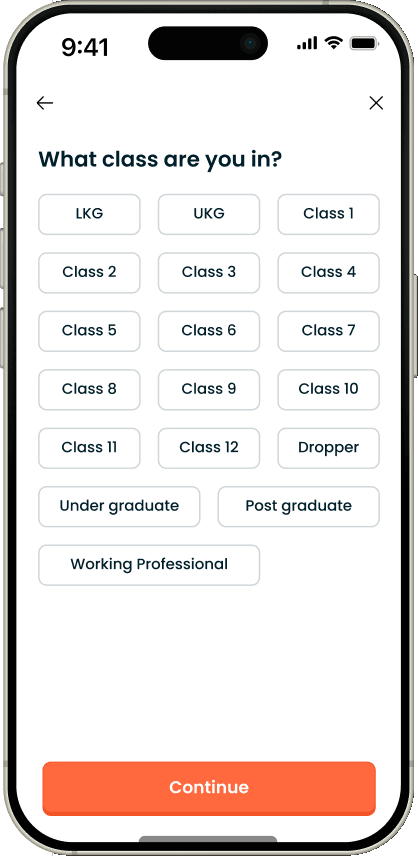
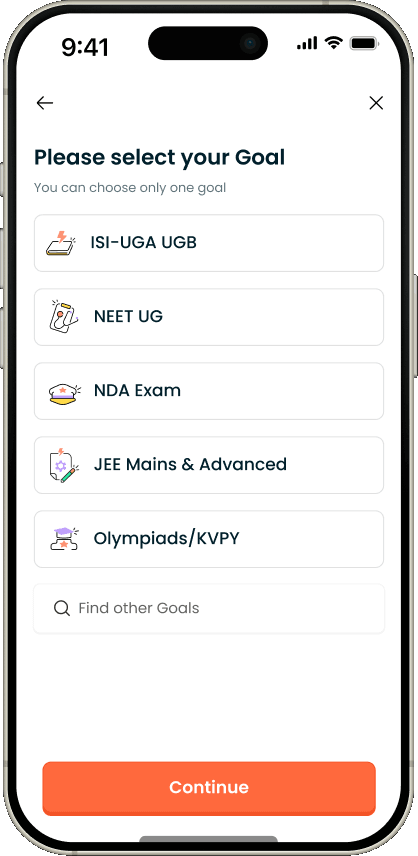
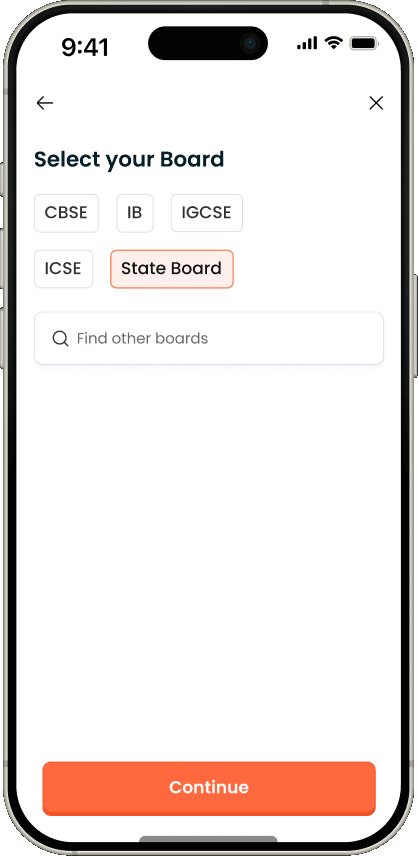
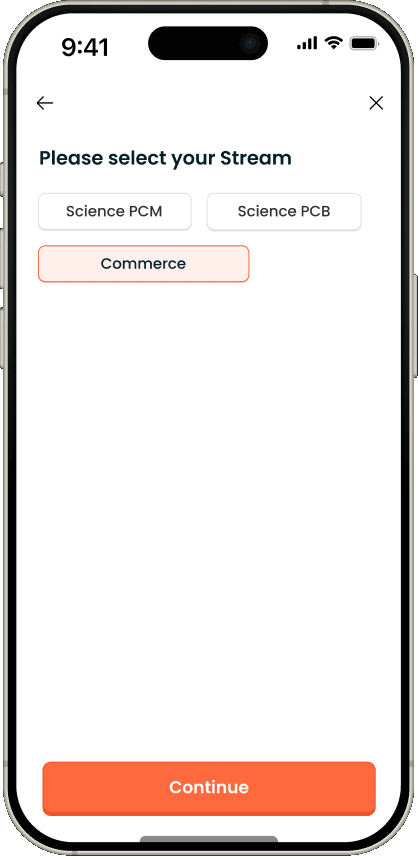
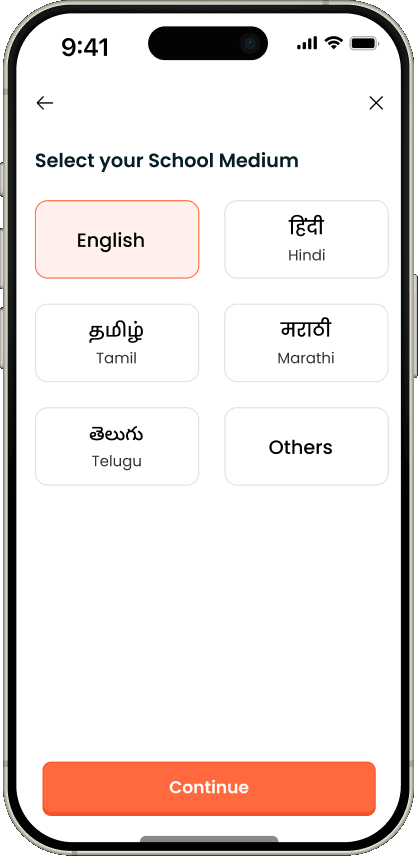
Every screen in the shipped journey: the sequence, the one-question-per-screen structure, the progress bar, the conditional rules that decide which questions appear, and the copy on each screen.
I proposed and framed the test
The team's explanation for the gap in completion was placement. I wrote it as a claim that could be proved wrong, defined the two versions and what each result would mean, and ran it with the analyst.
I specified every path and state
New and returning users, phone, Google and email, password and OTP, accounts that already exist, expired codes, international numbers, and the eight validation messages. This was the largest part of the work.
I set the rollout approach
I argued for leaving existing accounts untouched rather than prompting them to complete their records, and worked with engineering on how missing details would be collected later instead.
The Problem
Seventeen entry pointseach recording a different version of the same student.
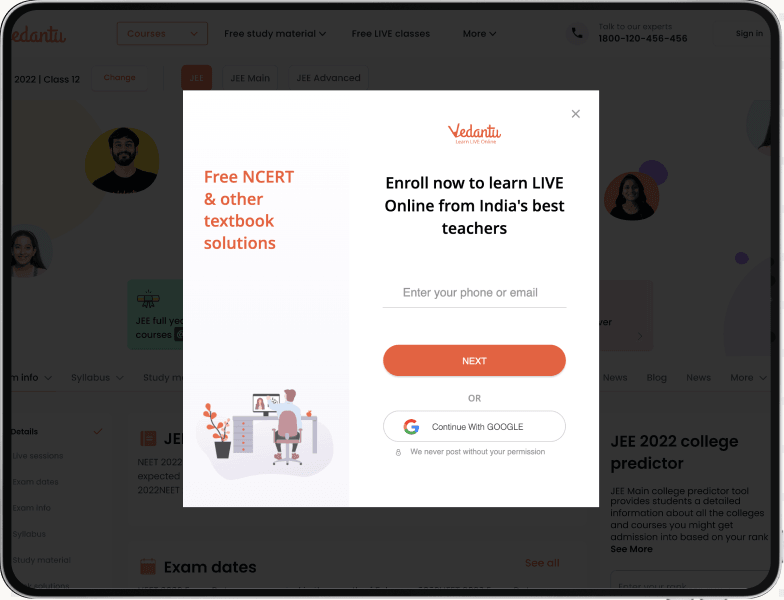
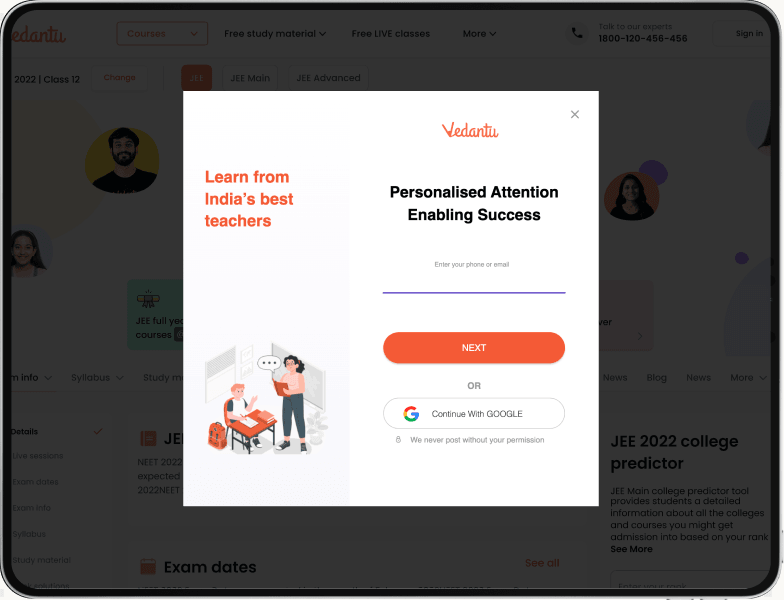
The website and the app had grown several separate signup flows, each asking for different details, in a different order, with different wording. The app asked for stream but never for city. The homepage asked for city but never for stream. The course pages asked for academic year, which nothing else did. None of them agreed on what a complete student record looked like.
None of this was the result of a bad decision. Each flow had been built for a specific page, at a specific time, by a team solving the problem in front of them. The cost only became visible once the records were put side by side.
That split cost us twice over.
For the company, grade, board, target exam and city were stored differently in each place, and sometimes not at all. Leads were routed to counsellors on details nobody could fully trust, course recommendations were built on partial records, and any analysis of who signed up had to begin by reconciling five formats. When a team cannot trust its own data about a user, every decision downstream is made with a margin of doubt attached.
For the student, signup was longer than it needed to be and different every time. A student who signed up from a search result, then returned through the app, met two unrelated experiences and was often asked for the same things again. Every extra question sits between a person and the thing they came for, and none of these questions had been reviewed as a set.
The brief was to build one signup flow that asks the same questions everywhere - grade, board, stream, target exam and language - on both app and web, with every answer written to one shared record. The constraint that made it interesting was that the business did not want less data. It wanted more of it, and more reliably. So the flow could not be made shorter by dropping questions.
The task was not to ask for less, but to ask for the same things in a way that felt shorter.
| Field | App | Web · Home | Web · SEO | BOD | Course |
|---|---|---|---|---|---|
| Name | Yes | Yes | Yes | Yes | Yes |
| Grade | Yes | Yes | Yes | Yes | Yes |
| Stream | Yes | No | Yes | No | No |
| City | No | Yes | Yes | Yes | Yes |
| Nearby loc. | No | Yes | Yes | centre | Yes |
| Medium | Yes | No | Yes | Yes | No |
| Mode of study | No | No | No | Yes | No |
| Academic yr | No | No | No | No | Yes |
Same product, five different versions of the same student. This is why every answer had to end up in one shared record.
Old - SEO Sign up flow
Old - Home Sign up flow
Two things followed from this table. The first is that unification was a data problem before it was a design problem. The second is that any new flow would have to carry the full set of questions, which meant the only lever left was how those questions were asked.
What we believed, and what we tested
Two flows, the same pages:64% completion against 54%.
Six months of data, from February to July 2024, showed the homepage signup completing at a consistently higher rate than the one on our search landing pages. The explanation the team reached for was the page itself: somebody who arrives at the homepage has usually already decided to look at us, while somebody arriving from a search result may only want the one worksheet they clicked on. On that reading, the homepage flow was not better designed, it was better positioned.
It was a reasonable explanation, and it was convenient. It implied the design work was already done and the fix was a matter of placement. That is exactly the kind of conclusion worth being suspicious of, because the two flows differed in more than one way at once: the homepage flow was also shorter and lighter. Position and structure were tangled together in the data, and nothing in six months of reporting could separate them.
So rather than design to the explanation, I wrote it down as a claim that could be proved wrong, and proposed testing it:
"Where the signup sits matters more than how the signup is designed."
Six months of data, from February to July 2024, showed the homepage signup completing at a consistently higher rate than the one on our search landing pages. The explanation the team reached for was the page itself: somebody who arrives at the homepage has usually already decided to look at us, while somebody arriving from a search result may only want the one worksheet they clicked on. On that reading, the homepage flow was not better designed, it was better positioned.
We ran both versions on the same set of search landing pages, splitting traffic evenly across all devices, so that position, traffic source and intent were held constant and structure was the only thing left changing:
Version A, the step-by-step flow: every question asked one at a time, each screen carrying a single decision, with a progress bar running the full length of the journey.
Version B, the homepage flow: fewer screens, fewer clicks, more questions grouped together, and a lighter visual treatment. This was the version the team expected to win.
- Version B · shorter flow
- Version A · step-by-step flow
Number entered → Number verified
Verified → Signup finished
Number entered → Signup finished (overall)
The step-by-step flow completed at 64% against 54%. The result did not support our assumption.
The gap held at every stage of the funnel, not just at the end, which mattered. A single-stage difference can usually be explained away by one awkward screen. A difference that appears at verification, widens at completion and survives to the overall rate is a property of the flow, not an accident of one step.
The result was more useful to the team than a confirmation would have been. A confirmed assumption would have sent us to work on placement and left the flow untouched. Being wrong told us the structure was the lever we actually had, and that more screens are not the same thing as more effort, as long as each screen asks for one thing and the end stays visible.
With the page held constant, the structure of the flow accounted for the entire difference.
The decisions
Five decisionsthat shaped the flow.
These are the five calls I made, and in each case what I was arguing against. Two are about strategy, two about the system underneath, one about the paths in and out. For each: the constraint, my decision, the result, and what it cost.
Decision 01 - Strategy · decided by testing
Testing our own assumption instead of designing around it
The problem :
Six months of data showed the homepage signup doing better than the one on search pages. The conclusion the team leaned towards was that the page was doing the work and the design was not. My brief, on that reading, would have been to copy the lighter flow onto more pages and call it done.
What I did :
I turned it into a test we could lose: run both versions on the same search pages, with the same traffic. If the page was the real reason, the design wouldn't change much. It did - 64% finished on the step-by-step flow against 54% on the shorter one. Being wrong early was the useful part: we shipped on evidence rather than on a hunch.
The result :
The funnel above. With the page held constant, structure was the only remaining explanation for a ten-point difference. The flow that shipped is the one the test supported, not the one the team predicted.
The trade-off :
The test took three weeks we could have spent building, and it risked returning a result that made the previous six months of assumptions look expensive. That risk is the reason it was worth running.
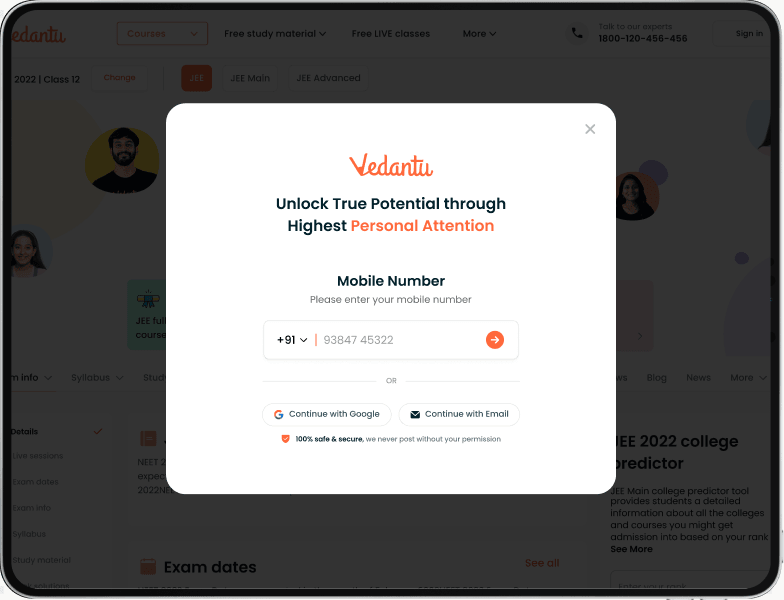
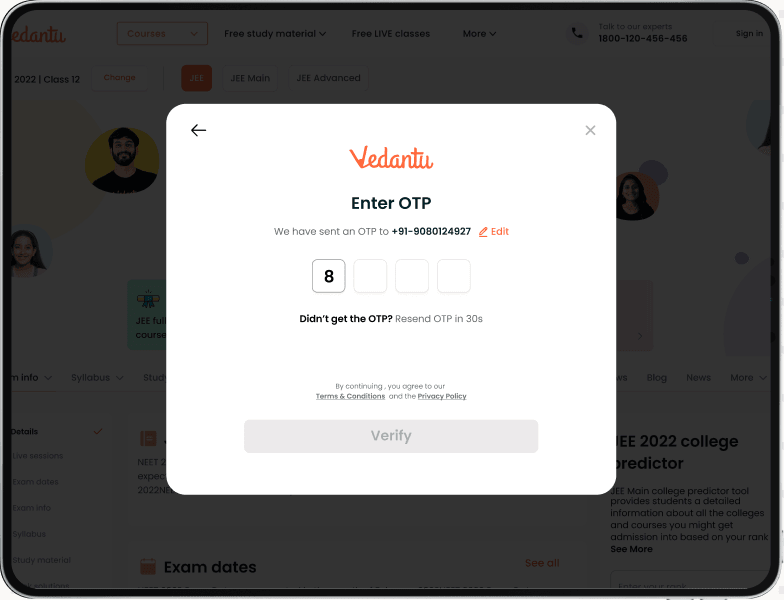
Web - Sign up flow
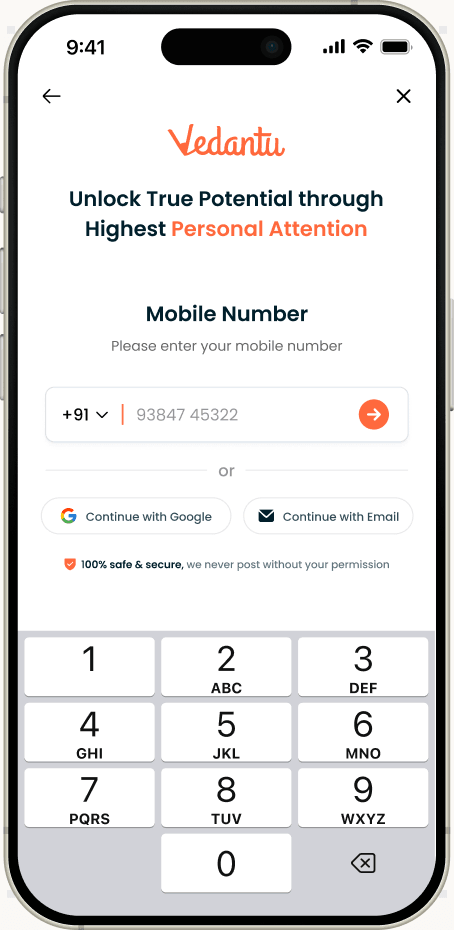
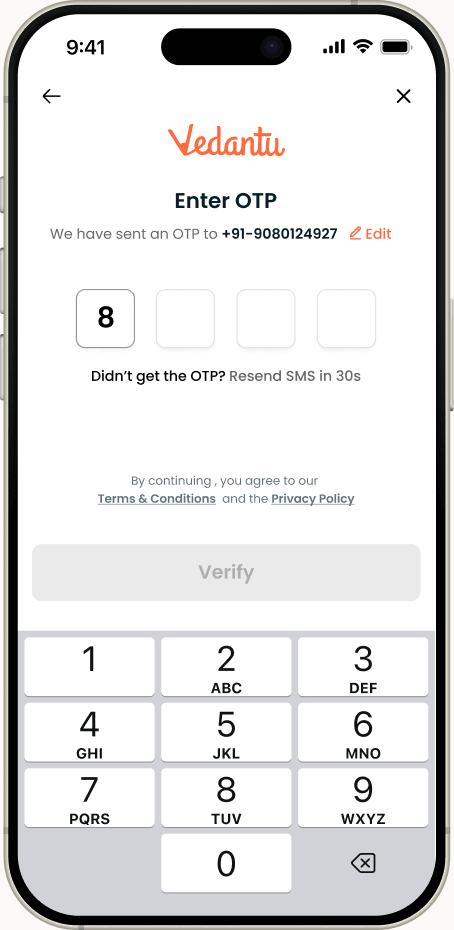
Mobile - Sign up flow
Decision 02 - Flow design · working within a constraint
Collecting more data while asking each user for less
The problem :
The business needed more accurate details - grade, board, stream, target exam. Students wanted a shorter signup. The two pulled in opposite directions.
What I did :
Rather than remove questions, which would have left the business short of the data it had asked for, I made questions appear only when they apply. Board appears only for the grades where a board is relevant. Stream appears only for Classes 11 and 12, and only when the stated goal is a board exam. Nearby location appears only in the cities where we have centres to offer.
The full set of questions stays intact at the level of the system. What changes is how many of them any one student meets, which is the number that actually determines how long signup feels.
The result :
Fewer questions per student, with no reduction in what we recorded. A Class 6 student answers noticeably less than a Class 12 student preparing for boards, and both produce a complete record for their case.
The trade-off :
Conditional questions make the flow harder to reason about, test and maintain. Every rule is a branch someone has to keep correct as grades, boards and centre coverage change. I judged that cost worth paying because it sits with the team rather than with the student.
My purchase
Payment Detail - Bundle
Payment Detail - Bundle
Track shipments
My wallet
Recharge Wallet
Decision 03 - System design
One shared record behind every entry point
The problem :
The real problem wasn't the screens. Every flow defined its own set of answers, so the same student looked different depending on where you checked.
What I did :
I built the flow around one shared set of signup details - grade, board, stream, target exam, language and city - with a fixed list of allowed answers for each. Every entry point reads from it and writes back to it. A change made once appears everywhere, and app and web stay in step without a person having to remember to align them.
This is the part of the project with the least to show visually and the most consequence. Without it, unification would have lasted until the next campaign page shipped with its own slightly different grade list.
The result :
The same questions, and the same set of answers, on both platforms. Records from the app and the web became directly comparable for the first time, which is what made lead routing trustworthy again.
The trade-off :
A shared record makes future changes slower on purpose. Adding a question is no longer a local decision that one team can make for one page, which is the point, but it does mean more coordination for anyone who wants to move quickly.
Decision 04 - Rollout · existing users
Rolling out a new flow without disrupting existing accounts
The problem :
A new flow is easy to be pleased with when you only picture new users. Vedantu already had millions of existing ones. Changing signup couldn't mean asking them to set up their account again.
What I did :
I limited the change to new signups and to details collected from that point on. Existing accounts carried on untouched, with no prompt to confirm anything and no forced return to signup. Where details were missing from an older record, we collected them later, at quieter moments inside the product where the question had an obvious reason to be asked.
The alternative was tempting and would have filled the gaps faster: show every returning user a short form and complete their record in a week. It would also have interrupted millions of people who had done nothing wrong, in order to fix a problem the company had created. The change belonged in the system, not in what we asked existing users to do again.
The result :
About 99.9% of existing users were unaffected. No re-onboarding, no forced migration screen, no support load from people wondering why their account was suddenly asking questions. Most of the work in a change like this sits with the people already using the product, not the ones arriving for the first time.
The trade-off :
Older records stay incomplete for longer, and the gap closes gradually rather than at once. That was the price of not disrupting people, and I would pay it again.
Decision 05 - Login and signup paths
Rolling out a new flow without disrupting existing accounts
The problem :
A single signup couldn't assume a single path. New users arrived by phone, Google or email. Existing users needed to log in with a password. Some arrived with a number or email already tied to an account. Any of those could have turned into a dead end.
What I did :
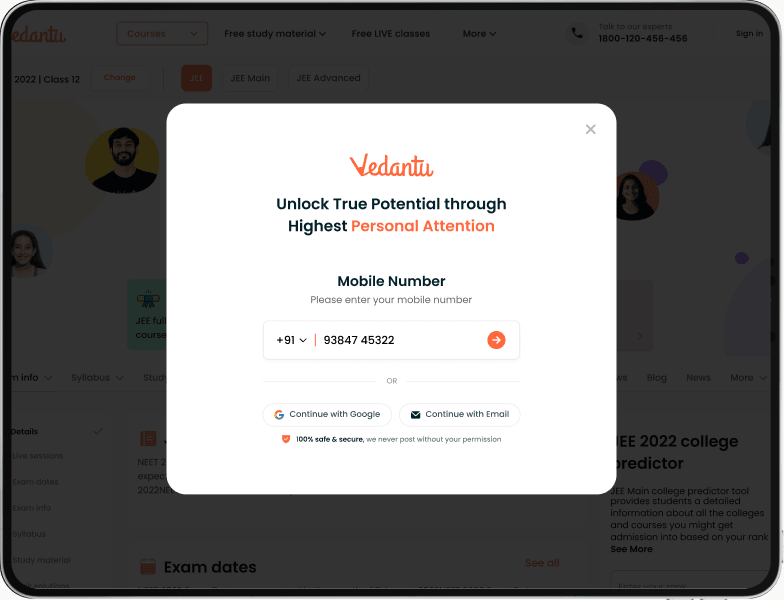
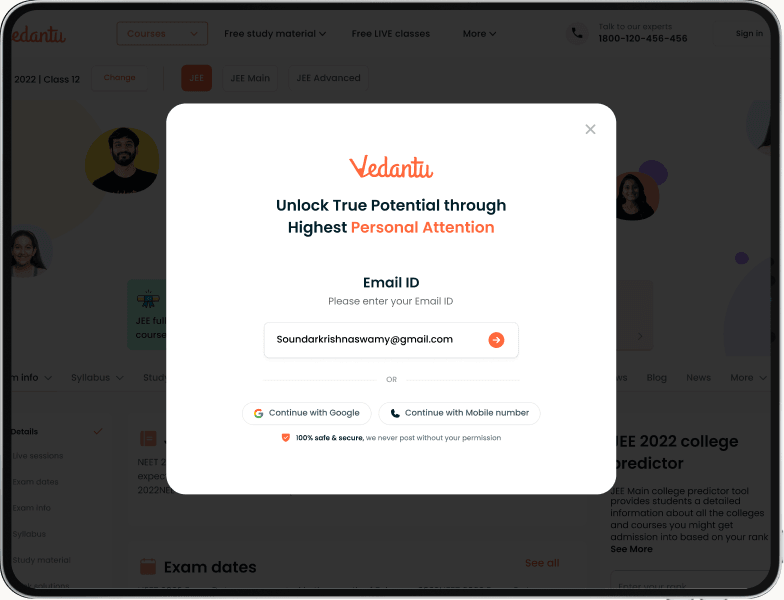
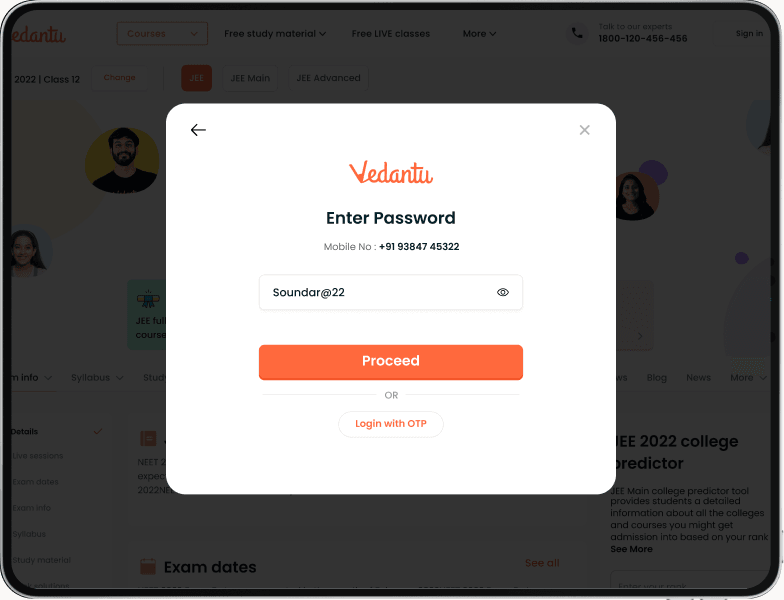
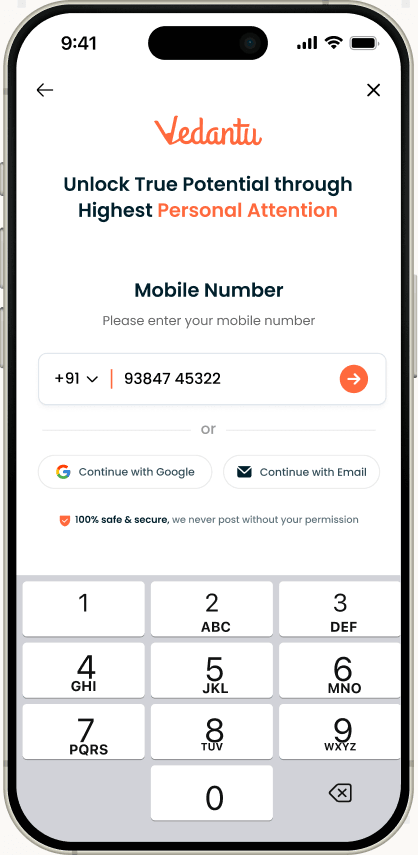
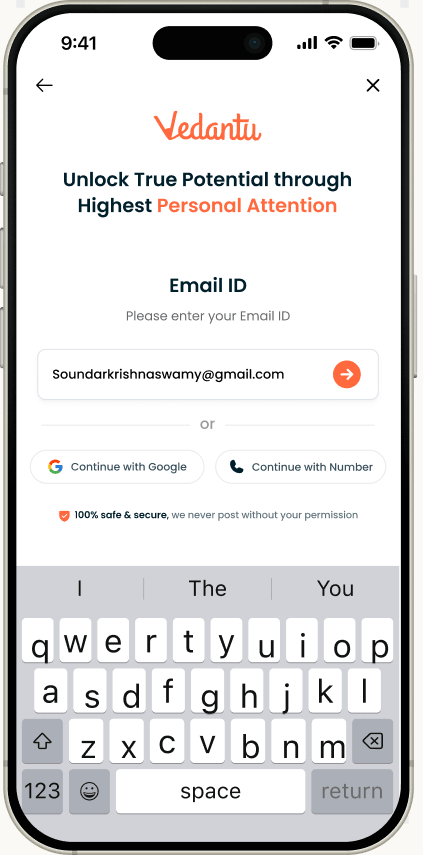
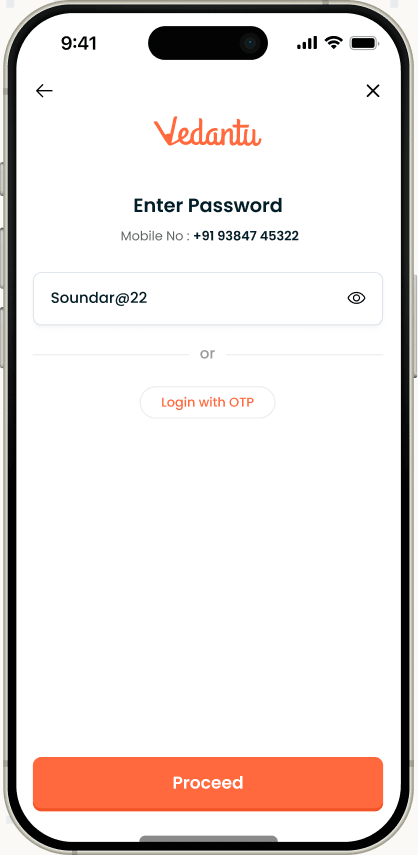
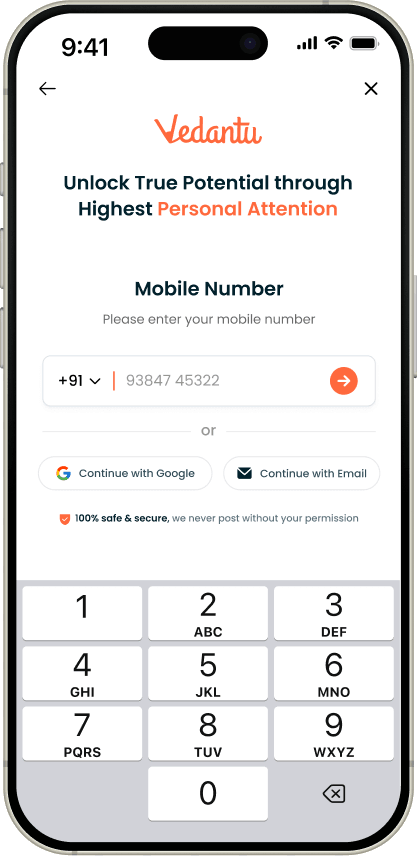
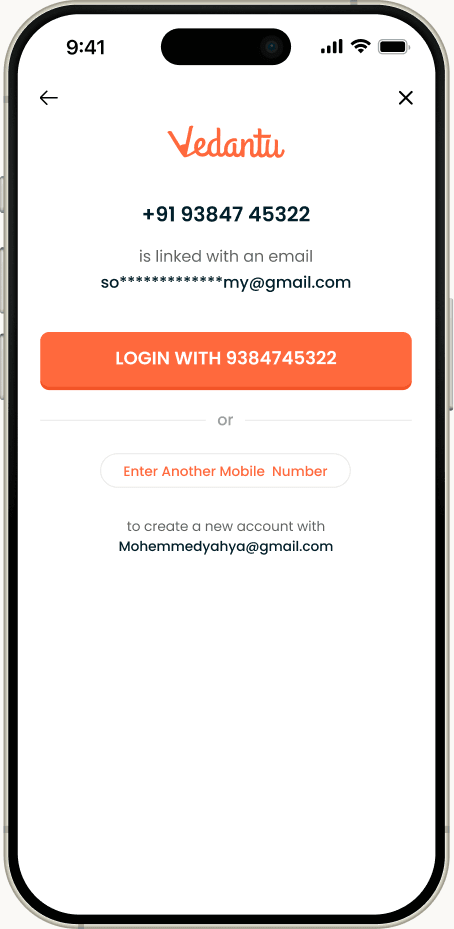
I made phone and OTP the main path, and fitted the rest around it. Google and email sit on the same first screen. A password screen appears only for people who already have one, with the option to log in by OTP instead. And when a number or email already belongs to an account, the person is told so, rather than running into a silent failure. Returning users see their own number or email, partly hidden, so the screen reads as recognition rather than a fresh interrogation.
The result :
Every path resolves, including the ones that fail. Verification held at about 83% of everyone who entered a number, once the flow was live for all traffic rather than a test slice.
The trade-off :
Making phone the main path means Google and email sit slightly lower in the hierarchy on the first screen. That is a deliberate choice for this audience, where a phone number is the identifier the rest of the business already runs on.
Continue with Google
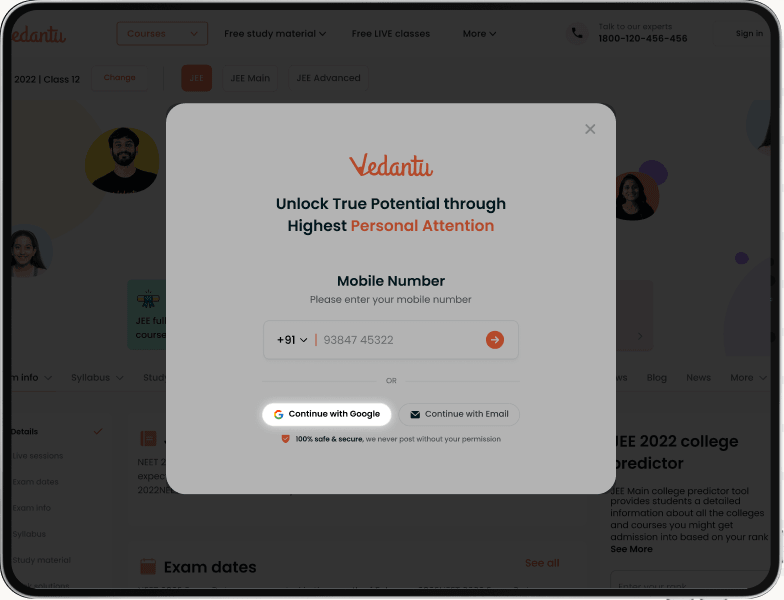
log in with Mobile Number
log in with Eamil - ID
log in with Password
Continue with Google
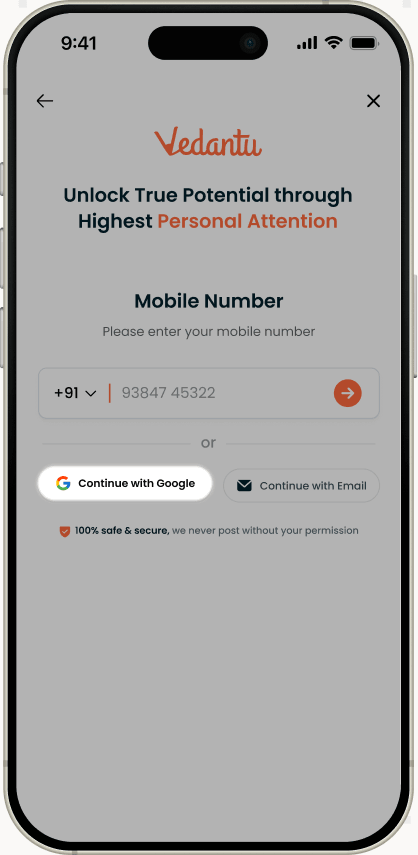
log in with Mobile Number
log in with Eamil - ID
log in with Password
The full flow
One entry point, seventeen sources,every path mapped.
One entry point handles new and returning users across phone, Google and email. Existing accounts go to login; new ones continue into the onboarding questions. I mapped every branch before designing a single screen, and that map is what kept all seventeen entry points consistent once engineering split the build across two platforms.
- Returning user path
- New user path
New-user questions
One per screen · only when relevant · one progress bar
- 01Name
- 02Grade
- 03Boardif applicable
- 04Goal
- 05Medium
- 06Stream11–12 only
- 07City +nearby
* OTP on WhatsApp for selected country codes · existing users see their own number or email, partly hidden
The flow, step by step
The five steps behind the64% result.
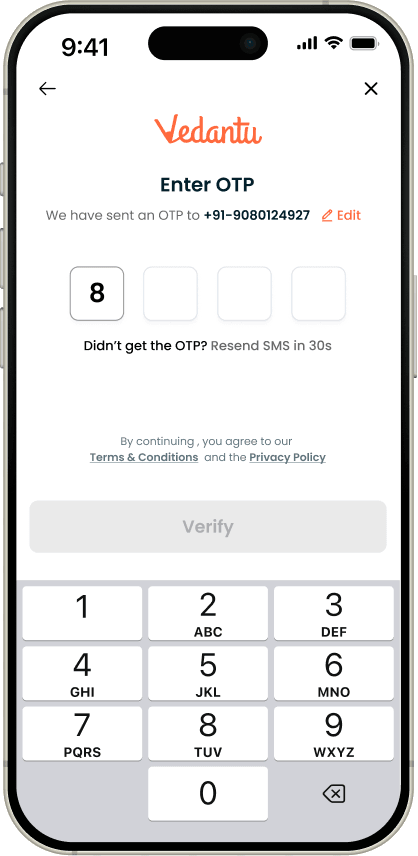
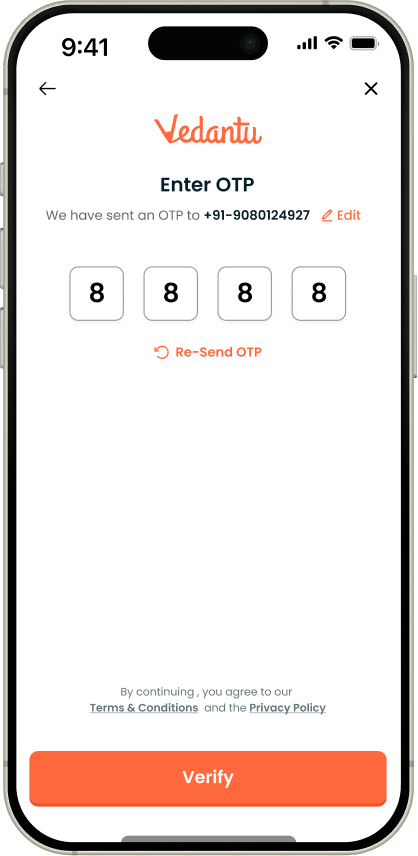
This flow has more screens than the version it was tested against, and a higher completion rate. Each screen asks one thing, and the progress bar runs to the final step, so the end stays in sight throughout.
Paths and edge cases
Six user pathsand eight error states,designed alongside the main flow.
One signup replacing seventeen separate entry points - homepage, search and download pages, course pages, free trials, offline centres and more - only works if every path and every failure has been designed for, not just the one where nothing goes wrong.
In a flow at this volume, these are not edge cases in any meaningful sense. A one-in-fifty failure is thousands of people a week. I specified the six paths and eight messages below myself, and they took longer than the five main screens did. They are the reason the completion figure held once the flow was live for everyone rather than for a test slice.
New user, by phone
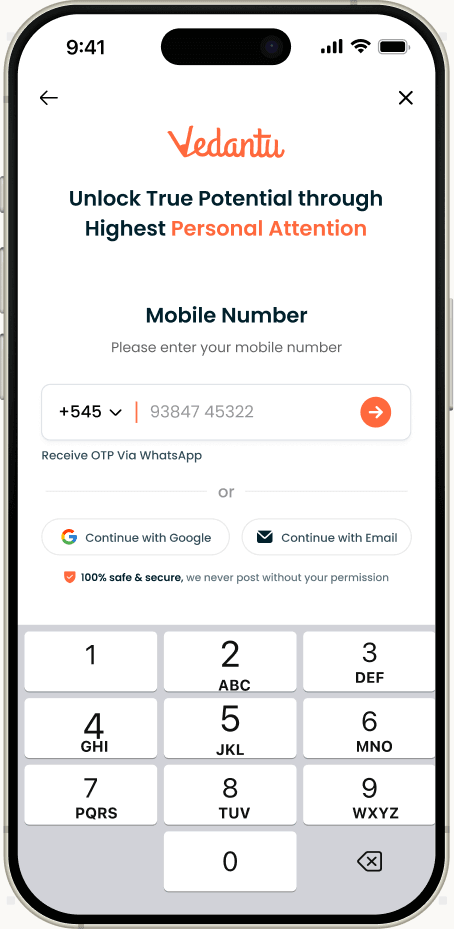
The keypad opens on its own, the OTP fills itself in from the keyboard suggestion, and the student goes straight into the questions. The shortest path, with the fewest taps.
Existing user, with a password
Recognised by number or email, then shown a password screen with their own contact details partly hidden, and the option to log in by OTP instead. Familiar, rather than starting over
Account already exists
If the number or email already belongs to an account, the person is told so, instead of running into a failure with no explanation or ending up with a second account.
International numbers
Indian numbers are checked at ten digits, international ones between six and fourteen. For selected country codes, the OTP can be sent on WhatsApp instead, which is where those students already are.
Leaving and coming back
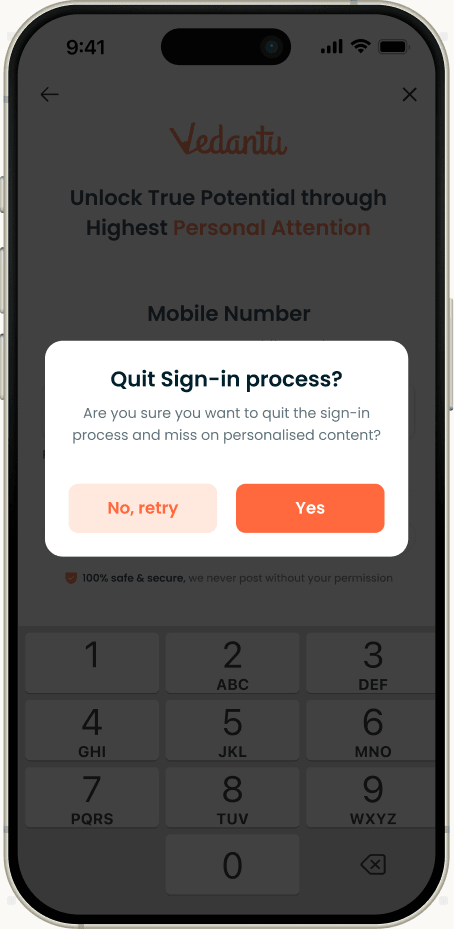
Closing the flow asks for confirmation first, so nothing is lost by accident. Going back from the name screen returns to verification, and asks for a new code if the old one has expired.
Questions that only sometimes appear
Board appears only for the grades it applies to. Stream only for Classes 11 and 12 preparing for board exams. Nearby location only in the cities where we have centres. Nobody is asked something that doesn't apply to them.
International Numbers
Existing User
Leavi
A known limitation :
We could not work out a student's academic year reliably enough to infer it, so the flow asks for it once a year instead. It is the one question in the flow that exists because of a limitation rather than a need, and it breaks the rule the rest of the design follows. I flagged it as a known gap with a proposal to derive it from enrolment and activity data later, rather than leave it as a permanent question.
I would also want a second test on the onboarding questions themselves. The test I ran compared two structures for the same set of questions; it did not tell us which of those questions earns its place. That is the study I would propose next.
Moving into the next academic year
Every student record goesout of dateonce a year.
A student record is only accurate for one academic year. The Class 10 student we recorded last year is in Class 11 now, has chosen a stream, and may be preparing for a different exam. If the record stays as it was, course listings, recommendations and counsellor calls are all aimed at a student who no longer exists.
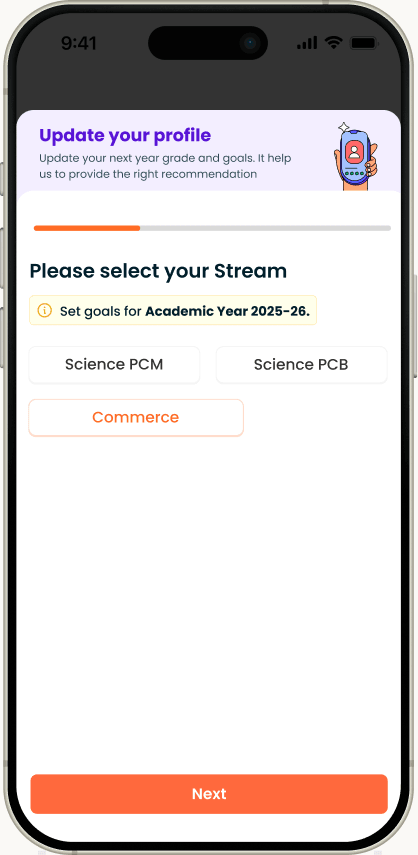
As the limitation above explains, we could not work out the new year reliably enough to update records ourselves. Moving everyone up one class would also be wrong for the students it matters most for: those choosing a stream after Class 10, and those finishing Class 12 who may take a drop year. So the platform asks. My job was to design that question for people who had already answered it once, so that it felt like a quick update rather than signing up again.
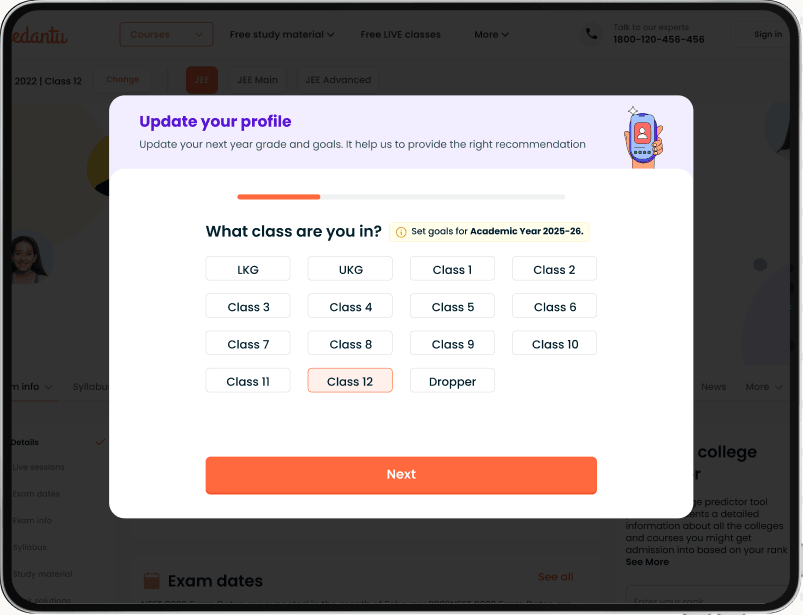
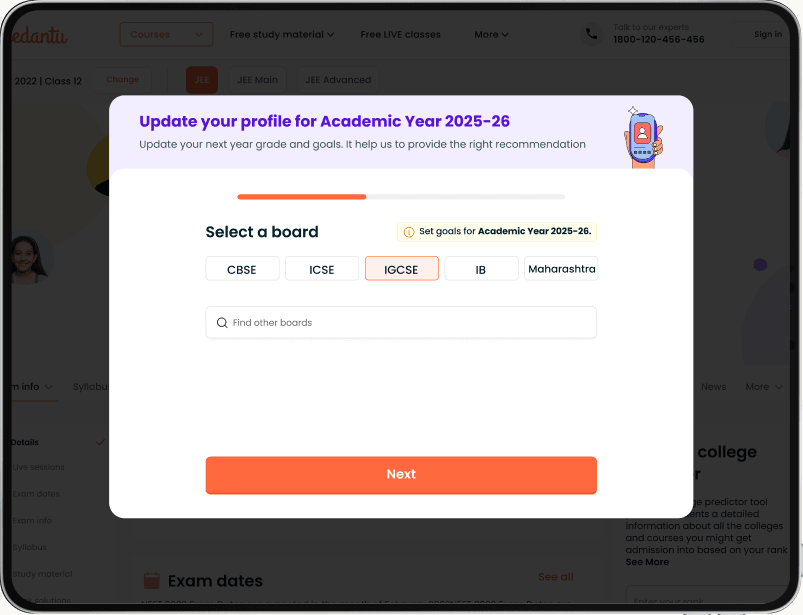
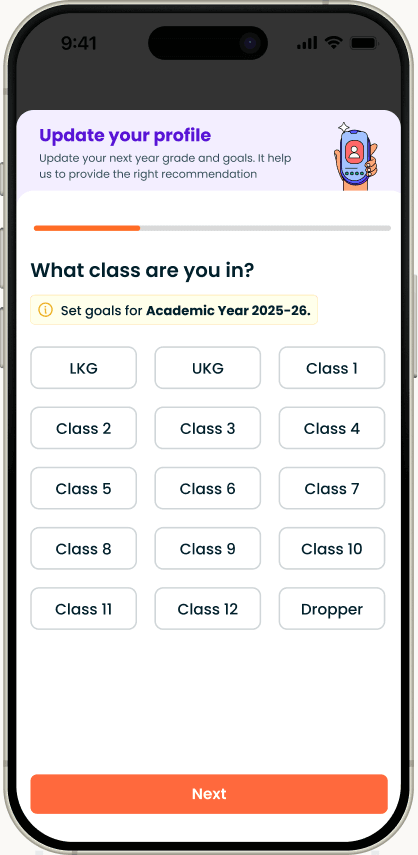
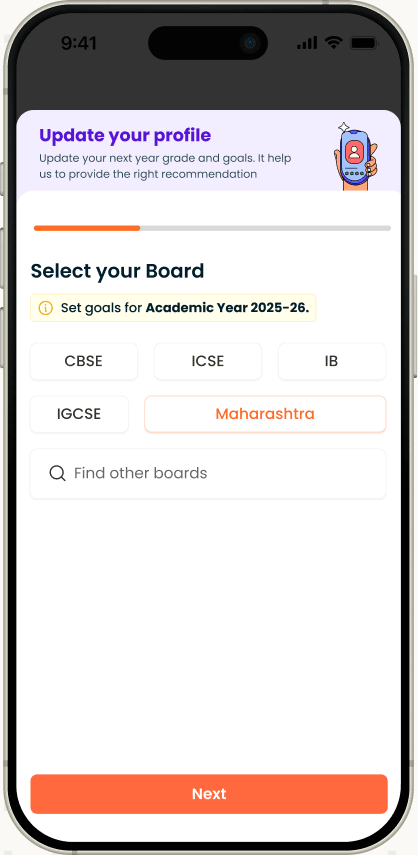
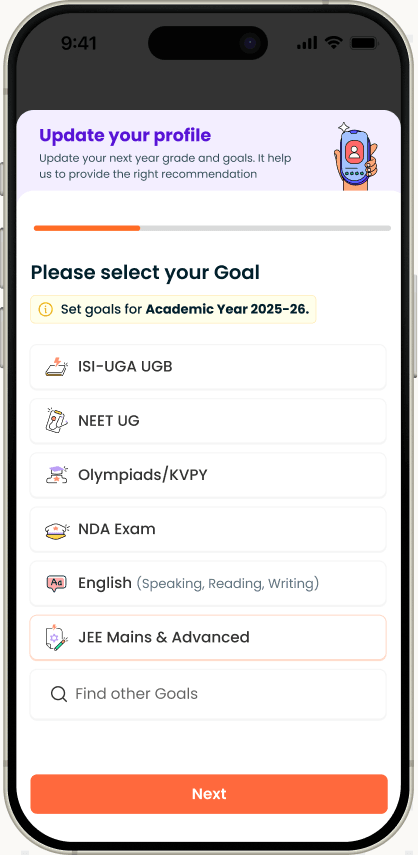
The same screens as signup
Grade, board, goal and stream use the same screens, components and answer lists as signup, and the answers go to the same shared record. Students meet questions they already recognise, and nothing downstream treats a yearly update differently from a new signup.
The year is named on every step
The header reads “Update your profile for Academic Year 2025-26”, and each question carries a “Set goals for Academic Year 2025-26” tag. Without it, “What class are you in?” is easily answered with last year’s class.
Only the details that change
Name, phone number and city are not asked again. The update covers grade, board, goal and stream, the four details that move when a student moves up, and stream still appears only for Classes 11 and 12.
The reason comes first
A short header above the first question says what the update is for: next year’s grade and goals, so the right courses are recommended. A student interrupted mid-visit knows why before being asked anything.
Long lists, with a way out
Board and goal show the most common answers first, with a search for the rest. The app’s goal list ends with “My exam is NOT listed”, so nobody is pushed into an answer that is close but wrong.
Where it appears, and how it ends
On the web it opens as a dialog over the homepage; on the app it sits inside My profile. The final step’s button reads Update rather than Next, so the student knows that tap is the last one.
Moving into the next academic year
What I took from it
Fewer questionsis not thesame thing as less effort.
The most useful outcome of this project was a wrong assumption, caught early and cheaply. The team believed placement explained the difference in completion, and that belief was supported by six months of real data. It was still wrong, and it was only visibly wrong because I framed the test so that our own position could lose.
The design lesson underneath it is narrower and more useful than "test your assumptions". Both versions asked for the same information. The version that won asked for it in more screens. What changed was not the amount of work, but how legible that work was: one decision per screen, a progress bar that ran to the end rather than resetting, and no screen that asked a student to hold two unrelated questions in their head at once. Length is felt as uncertainty, not as a count of steps.
The second lesson is about where the work actually lives. The five screens took a fraction of the time that the paths around them did - returning users, accounts that already exist, expired codes, international numbers, people who close the flow halfway. The completion number is produced by that second set, and it is the part of a project that is easiest to leave until the end and hardest to retrofit.
The third is that a data problem dressed as a design problem stays solved only if the data problem is solved too. One shared record was the least visible decision in this project and the one that determines whether the flow is still unified two years from now.
Lets talk
I design the data layer, not just thescreens
Designing for AI products. Open to conversations about product design.