

Case Study
VED AI: YOUR MENTOR,
ONE QUESTION AWAY
Any assistant can explain the law of motion. Ved gives you the video taught for your board, the notes for your class, in your language - because it knows all three.
- My Role
- Product Designer
- Platforms
- App & Website
- Scope
- VED - AI
- Year
- 2025-26
VEDANTU · VED AI · APP & WEB · 2025–26
A MENTOR THAT KNOWS YOU
your board, your class, your language
The Problem
Vedantu had everythingto give and no way to be asked
By 2025, asking an AI anything - at any hour, in whatever language you think in - had become normal for students. That part was solved, and not by us.
What it didn't solve is more interesting. A general assistant can answer any question and has nothing to hand you afterwards. It doesn't know your class, your board, your target exam or your last test score, and it has no video, no notes and no paper of its own to give you.
Vedantu had the exact opposite problem. All of that material already existed - across four products - and none of it could be asked a question.
The app
Courses, recorded lectures, notes, past papers, assignments. Where students spend most of their time.
WAVE
The live-class platform. One teacher, hundreds of students, doubts arriving at once.
Test series
Mock exams and practice papers, with a score report after each one.
Doubt solving
Photograph a stuck question. Experts on the other end.
An enormous content library, and years of data about every student - class, board, language, last week's score. All of it sitting behind a search box or a menu, waiting to be found by someone who already knows what they're looking for.
So the question wasn't "how do we compete with ChatGPT." It was simpler and more annoying: why can't a student just ask us?
“Show me a video on the law of motion”
- Returns a video on the law of motion
- Doesn't know your board, so the framing may not match your syllabus
- Doesn't know your class, so it may be three years too advanced
- Doesn't know your language
- Can't hand you the notes or the questions that go with it
“Show me a video on the law of motion”
- Returns the video - for your board, at your class level, in your language
- Taught by the Vedantu teacher who teaches that chapter
- With the timestamp to start at
- Followed by the notes for it and questions to test yourself
- Because it already knows all four things about you
Same question, completely different answer. Not because the model is better - because it knows who's asking, and it has somewhere real to reach.
The First Build
Making acontent libraryanswerable
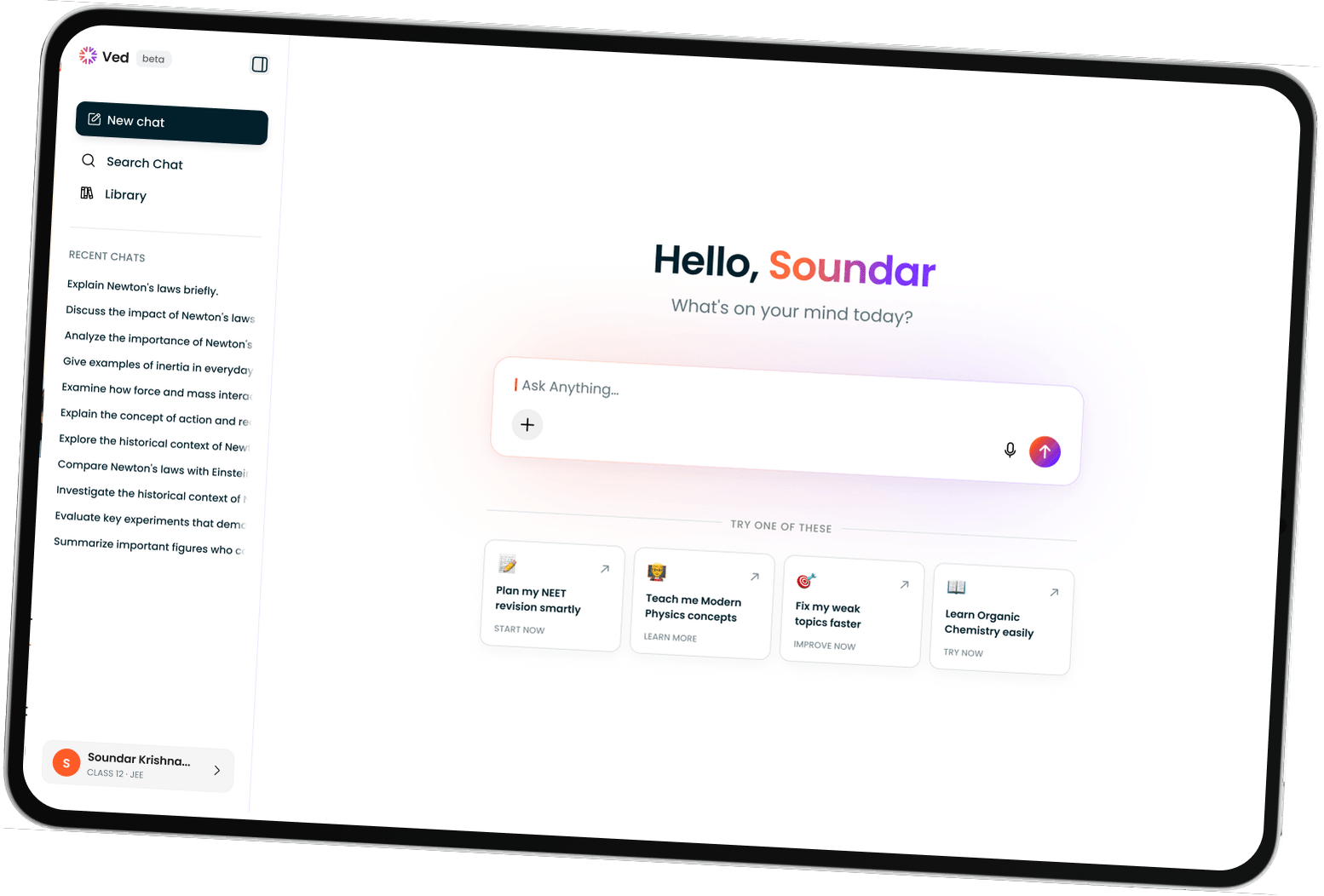
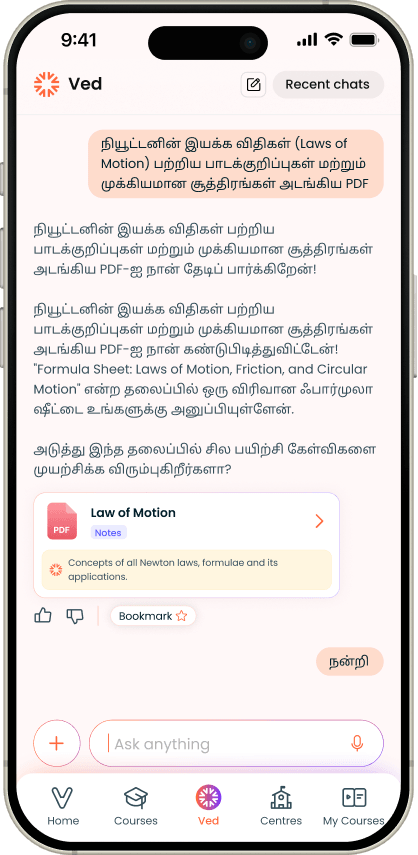
Before the decisions, what the thing actually is. Ved is a chat assistant inside Vedantu's app. A student asks the way they'd ask a tutor - typed or spoken, in English, Hindi or Hinglish - and gets an answer written for their class and board, followed by the Vedantu material that goes with it.
It isn't a general assistant with a school theme painted on. Three things sit behind every single reply: who the student is, how Vedantu's syllabus is structured for that board and class, and Vedantu's own content and performance data about that student. Every decision in this section follows from those three being available - and from the fact that they're worth nothing unless a student can reach them in one sentence.
In its first year it carried roughly a million messages from about three hundred thousand students, across the Android and iOS apps, mobile web and desktop.
Explain this
Any concept, at the depth their class needs, in the language they wrote in.
Give me the material
Notes, lecture videos, past year papers, practice tests - filtered to their board and class, not searched for.
Teach me a chapter
A full path rather than one reply: the video, then the notes, then questions to test yourself.
How did I do
Reads their actual test attempts down to the individual question, names the weak topics, and hands back what fixes them.
My classes
Which sessions are coming, what was covered, what they attended, and the replay if they missed it.
Exams and admissions
Dates, cutoffs, eligibility, courses. Anything that moves every year is checked against a live source rather than answered from memory.
What it's built from
The library, made reachable
- The syllabus itself - every board, class and target exam, chapter by chapter
- The lecture library, with the teacher who teaches each chapter
- Notes in three forms: detailed, revision, formula sheet
- The question bank and past year papers, weighted by how often a topic is examined
- Mock tests and the live class schedule
Who is asking, right now
- Class, board, stream and target exam - the four onboarding answers
- Every test they've taken, down to which question they got wrong
- Which classes they attended and which they skipped
- What they've asked before, so the conversation carries
- The language they write in, matched in the reply
Either side on its own is a search box. The product is the join - and the join is the one thing a general assistant can't copy.
Ved
Where ItLives
The app
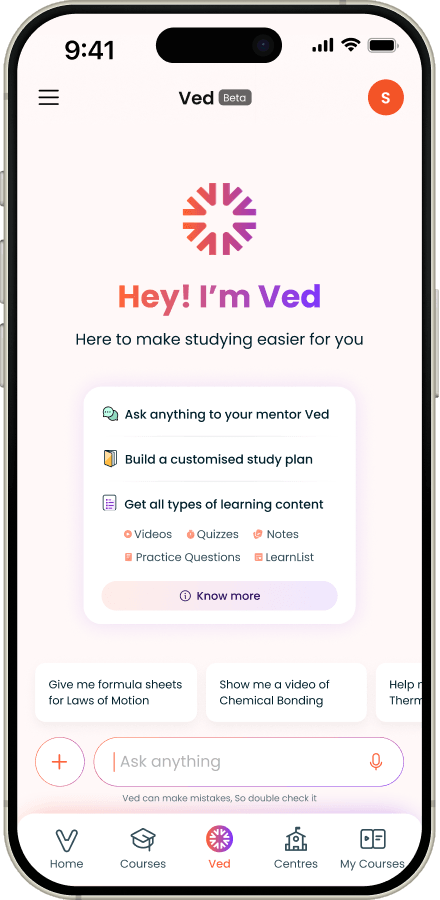
A tab beside Home, Courses, Centres and My Courses - where students already spend their time.
Web
Mobile and desktop, the same product with a layout that uses the space it has.
Teach me a chapter
A full path rather than one reply: the video, then the notes, then questions to test yourself.
- Home
- Courses
- Ved
- Centres
- My Courses
Ved wasn't a separate app. It became a tab in the Vedantu app, beside Home, Courses, Centres and My Courses - because the point was to sit where students already were, not to ask them somewhere new.
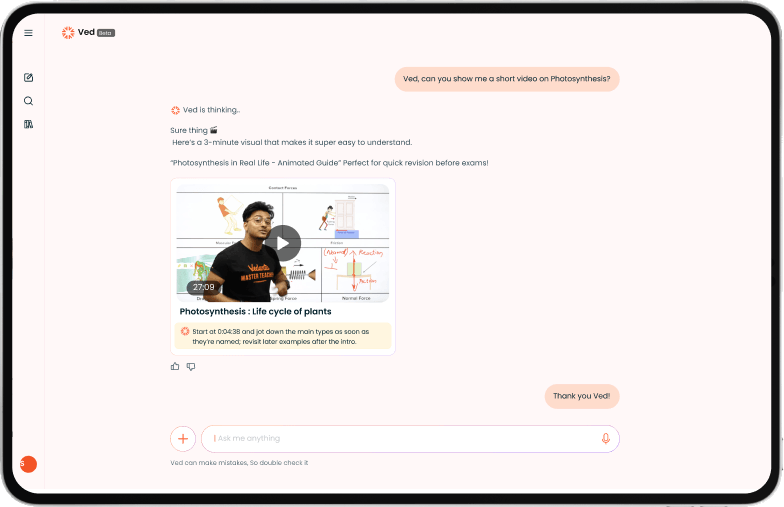
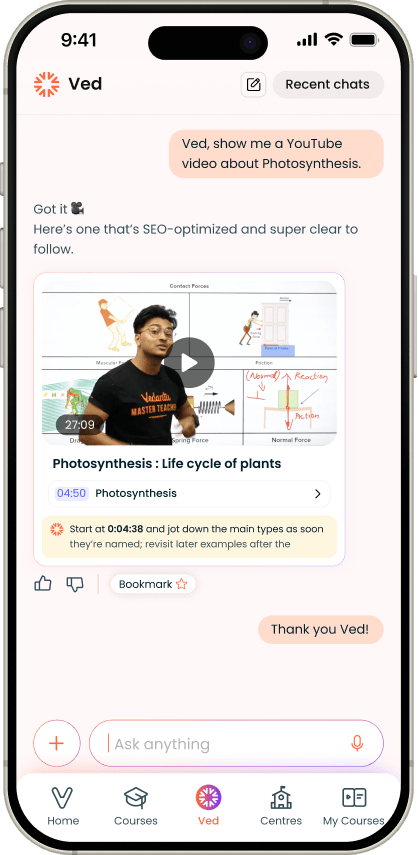
Ask it anything and it answered inside the student's own syllabus, then handed over the material itself: the video with a timestamp to start at, a PDF of notes, a set of questions.
The Chat
Knowing who is asking, before answering
The third screen is the whole argument: identical words from a class 8 and a class 12 student, two different replies.
The problem :
"Law of motion" for a class 5 student and "law of motion" for a class 12 student are the same words and completely different material - different depth, examples, and exam framing. Without knowing which student is asking, Ved can only return a general answer, which is exactly what's already available for free.
What I did :
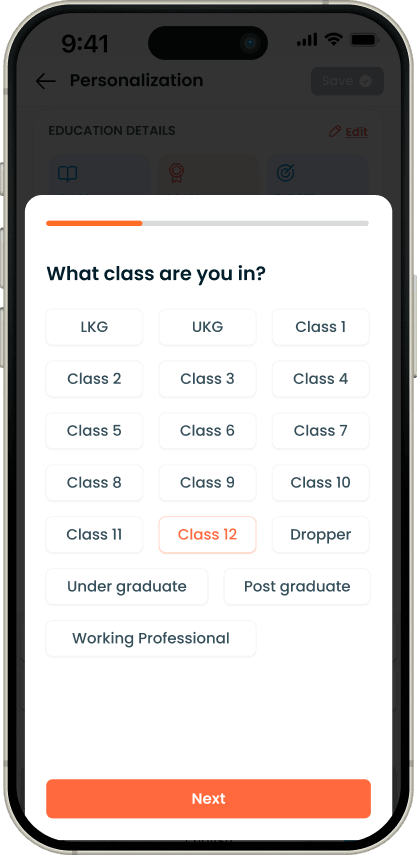
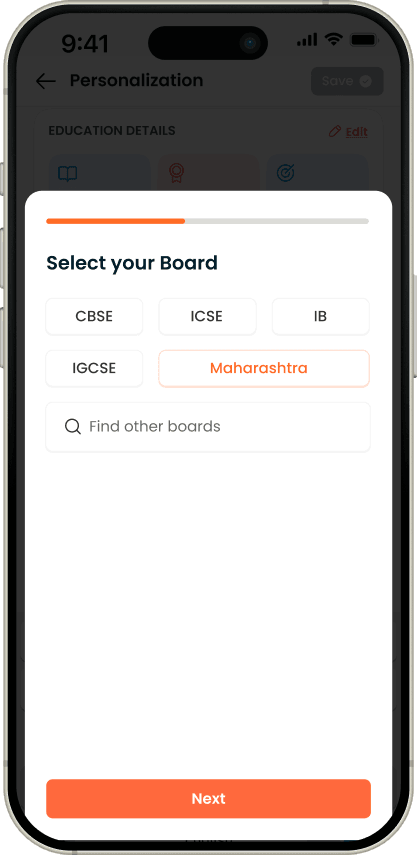
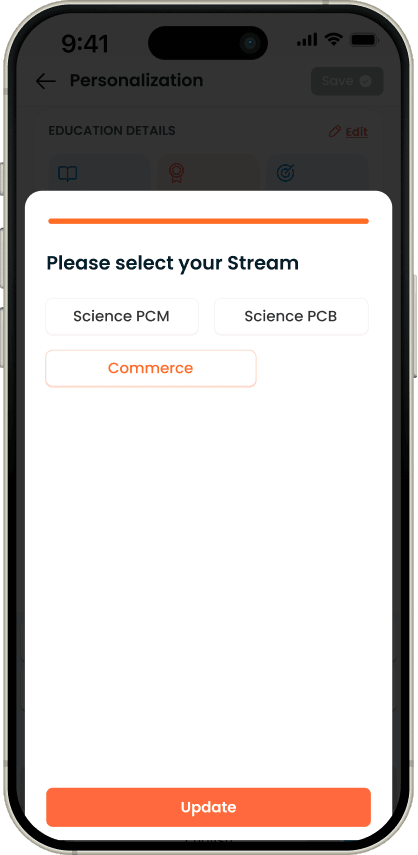
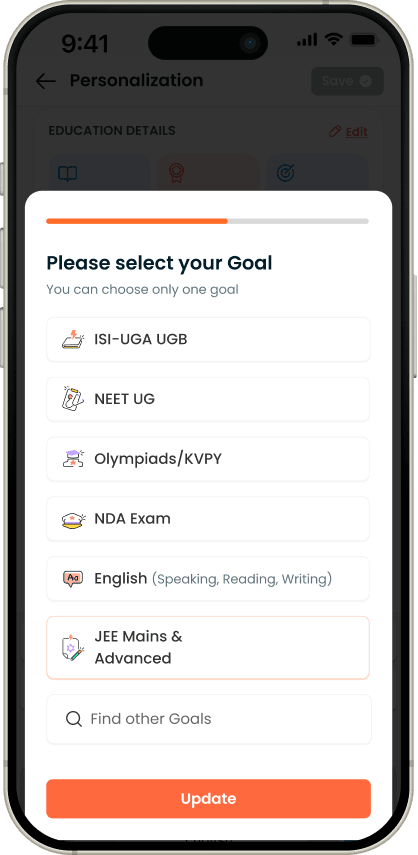
Four steps, every student, no skip. Each answer filters the library down to the right depth. The very next reply visibly uses all four, so the student sees what the questions bought them rather than taking it on trust.
Why it was right :
Every one of the four is load-bearing. Dropping any to shorten the flow would have meant a shallower answer for the rest of that student's time in the product - trading a permanent advantage for one screen of convenience.
The reply - answer first, then the content card
The student asks - typed, in their own language
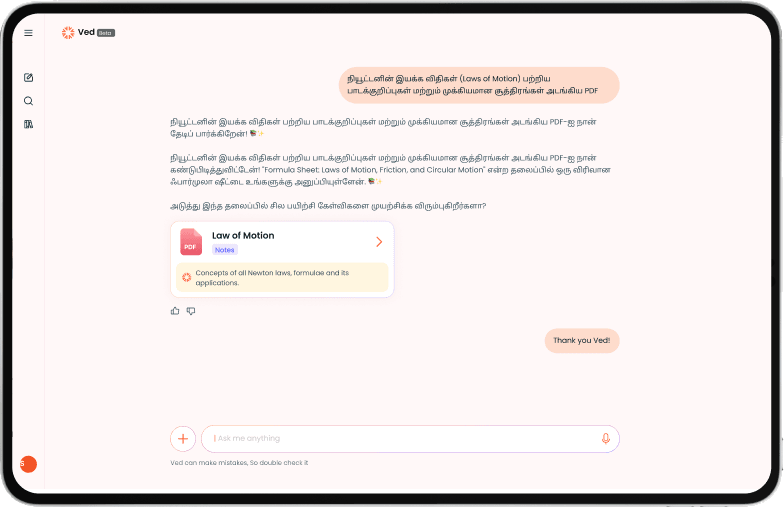
Home page
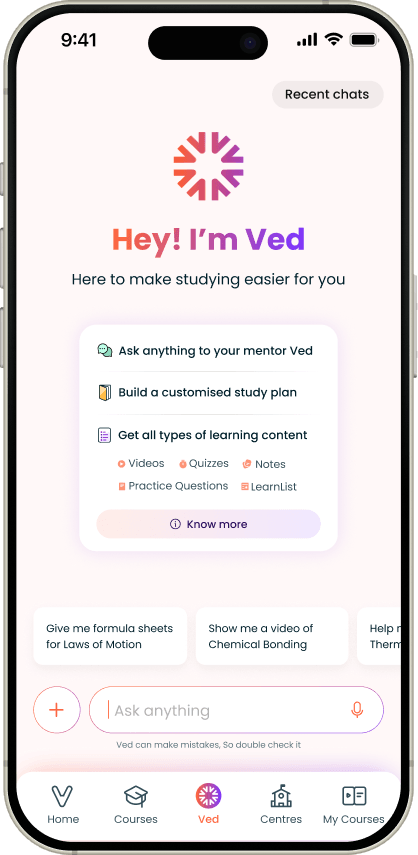
Content
Own language
Screens · Onboarding
A chapter as a path, not a wall of text
When a student asked for something bigger than one answer - "I want to study all of biology basics, any playlist?" - a block of text was the wrong object. Ved returned a card instead: Learn this topic with Ved · Video · Notes · Questions.
Class
Board
Stream
Goal
Chat → Content
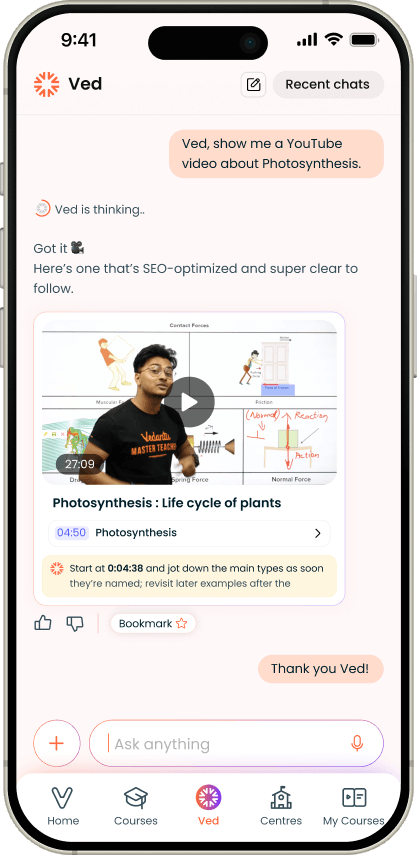
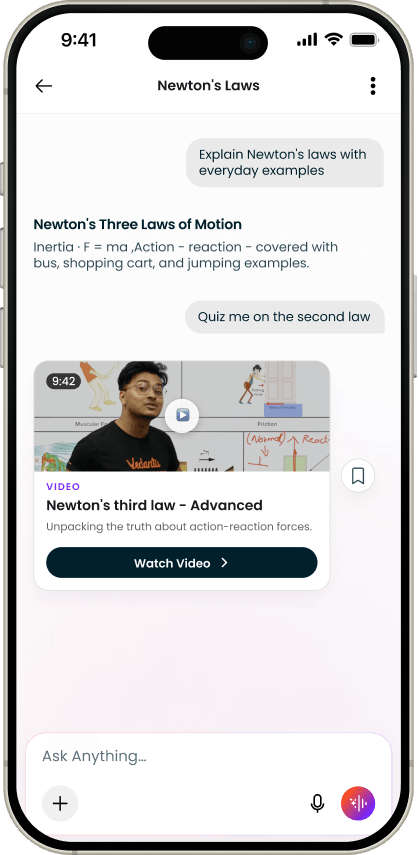
A video that knows where to start
A 27-minute lecture is not an answer to a five-minute question. So the video arrived with a timestamp to jump to and a line on what to write down.
Once playing, it listed every topic inside the lecture and the parts around the one you came for. Lectures stopped being homework and became something you could enter in the middle of.
The problem :
A chapter has three kinds of material and no obvious order. Get it wrong and the student reads notes for something they don't understand yet, or answers questions on something they haven't read.
What I did :
Fixed the sequence to how a student actually studies: watch the concept, read the notes, then test whether it stuck. The question set isn't a fixed count - it's sized to the chapter and drawn from the most-asked and highest-weight questions for that topic.
Why it was right :
Ved's heaviest users are classes 10 to 12 and repeat-year students. They already study in that pattern and expect it, so the structure needed no explaining.
How Ved Behaves
The part of the design thatisn't a screen
With an assistant, a large share of the experience isn't laid out - it's written. How long a reply runs, what tone it takes, when it asks a question back, and what it refuses to do are all design decisions, and they were specified as precisely as any layout.
Tiered by class, because a good tutor changes register
A tutor who answers a twelve-year-old the way they answer a repeat-year engineering candidate is a bad tutor.
Classes 6-8
Warm and encouraging. Explains through comparison - a cell as a factory, a circuit as a water pipe.
Classes 9–10
Balanced, a little more formal, focused on building the base properly.
Classes 11–12
Precise and exam-shaped. Step by step, competitive patterns, nothing extra.
Underneath the tiers, four rules that held everywhere. Keep replies the length of a message, not an article. Give detail gradually rather than dumping a plan. Ask at most one question back, and only when the answer genuinely can't proceed without it. End with encouragement and one concrete next step.
What it does when it shouldn't answer
An assistant built for teenagers under exam pressure meets things it must not attempt. Rather than leaving this to the model, each case got a defined response.
A medical or clinical question
Refused. Not softened, not attempted with a disclaimer.
Anything off-topic
A short redirect, not a lecture about scope.
A student in distress
Emotional support is in scope - name the feeling in a line, offer one small doable thing. Counselling is not.
Any sign of self-harm
The normal flow stops entirely. A supportive message, a verified helpline, and the exchange flagged for a person to look at.
Underneath the tiers, four rules that held everywhere. Keep replies the length of a message, not an article. Give detail gradually rather than dumping a plan. Ask at most one question back, and only when the answer genuinely can't proceed without it. End with encouragement and one concrete next step.
Two failures I had to design around
Two things went wrong in ways no screen could fix. Ved sometimes answered a student who wrote in Hindi with a reply in English. And it sometimes answered a question about this year's exam with last year's information - dates, cutoffs and eligibility rules all move.
The PM and engineering team led both fixes. What they changed for me was what I could assume: I couldn't take it as given that a reply would come back in the language the student wrote in, and I couldn't treat anything dated as safe to display without a check behind it.
What the Data Told Us
Students were using a mentor likea search box
Every message had been logged and sorted by what the student wanted, from day one - Ved was built to be a listening tool as much as an answering one. A year in, it paid out.
83 of every 100 conversations ended within two messages
The typical conversation was one message long
Students asked one thing and left. Not because the answer was bad - they didn't come back to say it was bad, or to say anything at all.
The reason wasn't hiding. Everything Ved could do sat behind a request the student had to already know how to make. Ask for a playlist and a beautifully structured chapter page appears. Never think to ask, and you never find out it exists.
What they asked for
- Notes and study material
- Mathematics
- Past year question papers
- Chemistry
- Exam strategy
- Physics
Relative volume of student requests. Notes were asked for a quarter more often than the next thing on the list.
Sorted by what students wanted rather than which subject, the picture sharpened.
- Help with tests and scores
- Wants a video or a live class
- Explain this concept
The largest single need was asked for nearly twice as often as anything else.
When they came
Two things went wrong in ways no screen could fix. Ved sometimes answered a student who wrote in Hindi with a reply in English. And it sometimes answered a question about this year's exam with last year's information - dates, cutoffs and eligibility rules all move.
Use climbs through the evening, peaks at 7pm and stays heavy past eleven. The busiest hour carries well over thirty times the quietest, and midnight alone carries more than 2am, 3am and 4am put together.
This is night-before-the-test software. It gets used tired, on a phone, one-handed, often with the room light off. Everything that followed about reply length, tap size and how much a student has to type comes back to this chart.
The Rebuild
Almost nothing new.Everything findable.
The obvious response to flat engagement is to build more. The data said the opposite. Ved was already doing four genuinely valuable things and students couldn't see any of them.
So the second version is mostly not new capability. The design file is organised the way the work actually ran - UI changes on one side, new features on the other, mobile and web tracked separately - and the UI-changes side is roughly three times the size of the new-features side. What got added was memory, a library, a history, and a way to ask without typing. What got changed was everything about how a student finds any of it.
Screens · Home
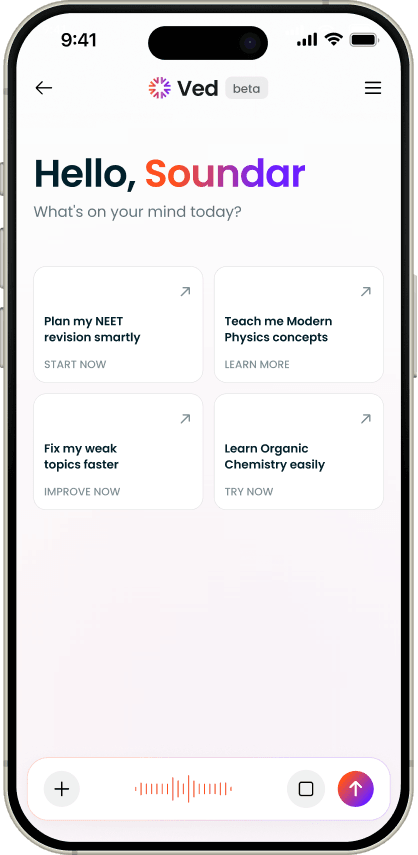
Decision · four suggestions instead of an empty box
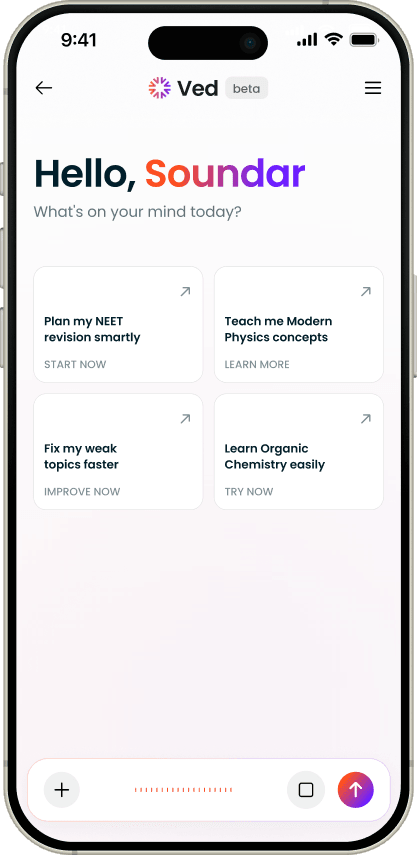
A home screen that proposes the work
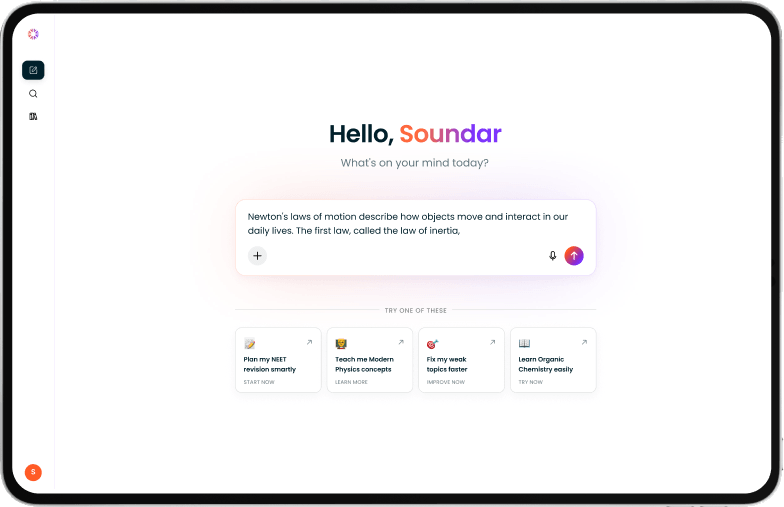
The first version opened on an empty input box. That box is the one-message finding in a single object: it asks the student to already know what Ved can do before they can get anything out of it.
The problem :
83% of conversations ended within two messages, and the typical one was a single message long. Not because the answers were bad - because everything Ved could do sat behind a request the student had to invent. An empty box is a test of imagination handed to someone who is tired and behind on revision.
What I did :
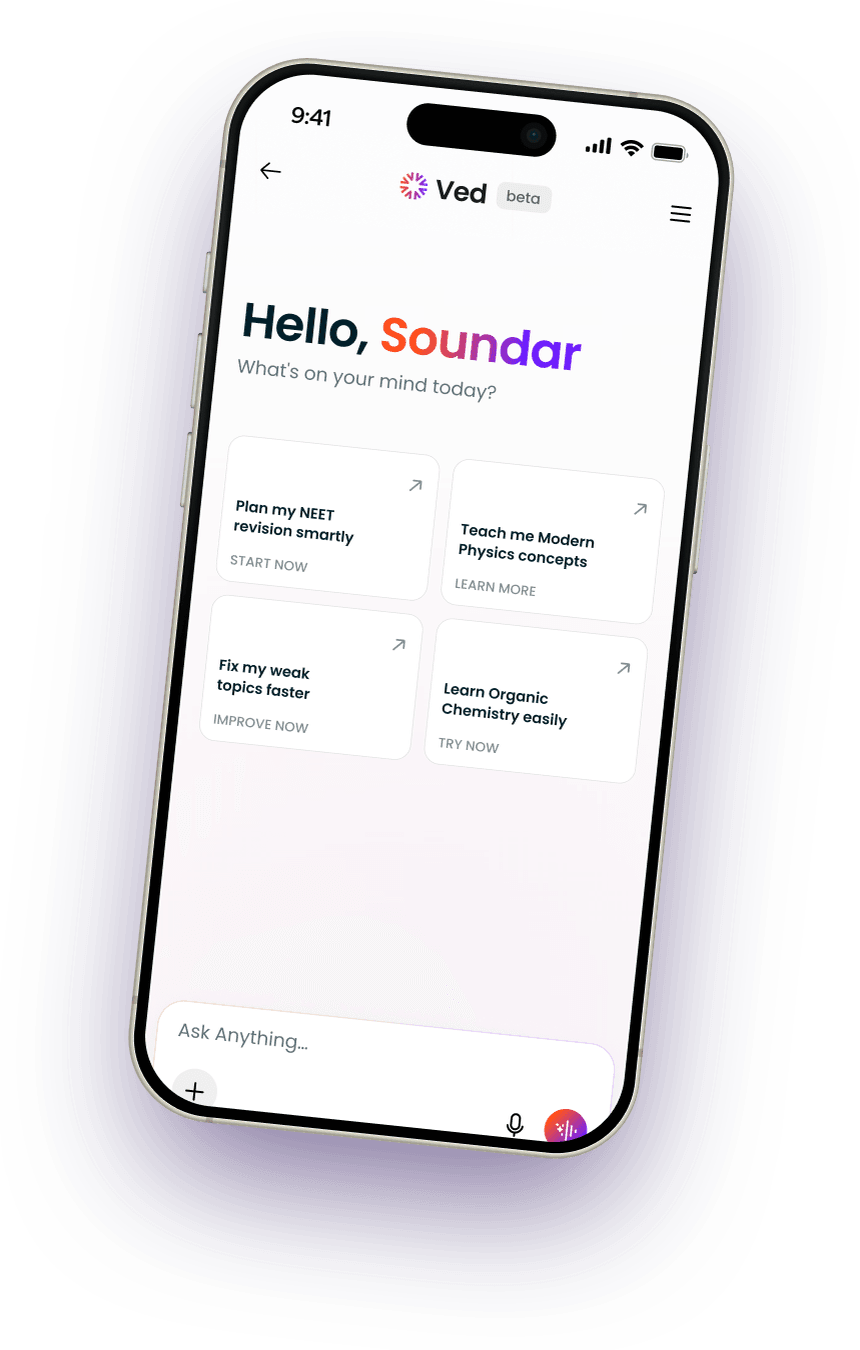
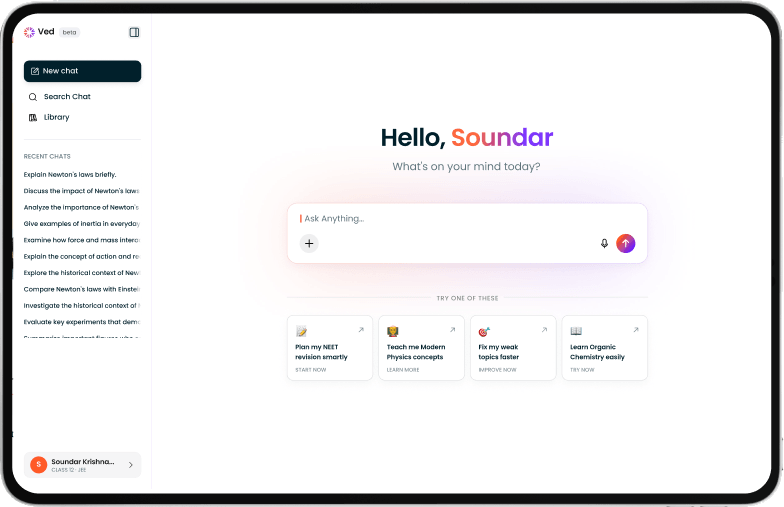
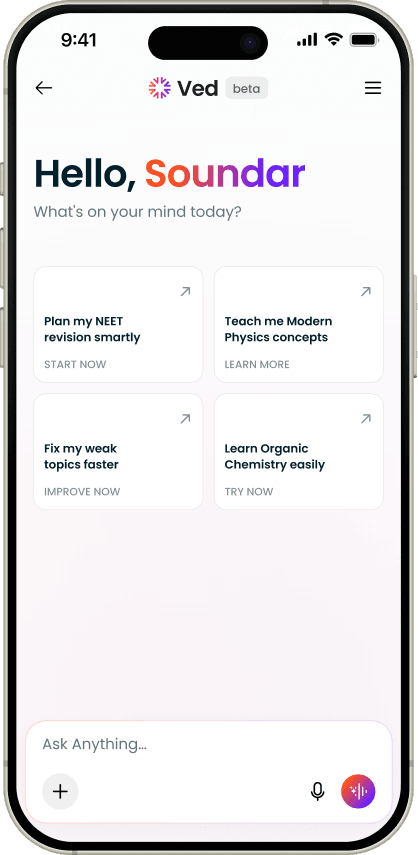
The home screen now opens with a greeting that uses the student's name and four cards that propose real work: Plan my NEET revision smartly, Teach me Modern Physics concepts, Fix my weak topics faster, Learn Organic Chemistry easily. Each carries its own verb - START NOW, LEARN MORE, IMPROVE NOW, TRY NOW - so the four read as four different kinds of help rather than four phrasings of one.
Why it was right :
The four aren't a guess. They're the four things the logs said students already wanted most - test and score help, concept teaching, weak-topic repair, and learning a chapter end to end - put on the first screen instead of behind a sentence the student has to compose. A student who taps a card has, in one tap, started the kind of session the product was built for.
Home - greeting and the four cards
The student asks - typed, in their own language
VED Home
without pre-prompts
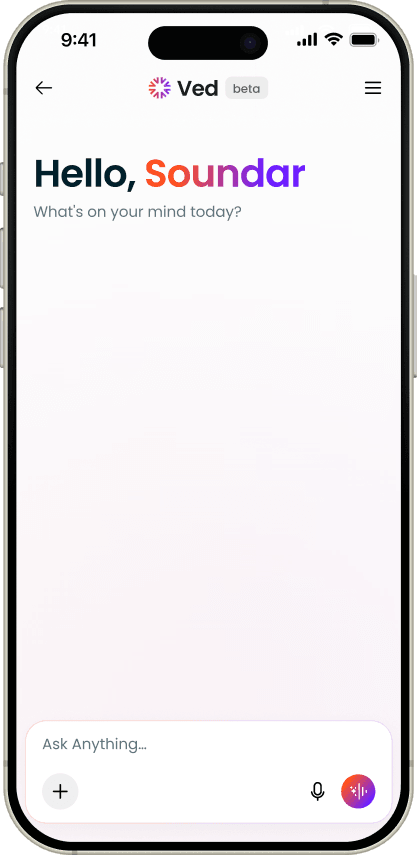
Image Uploaded
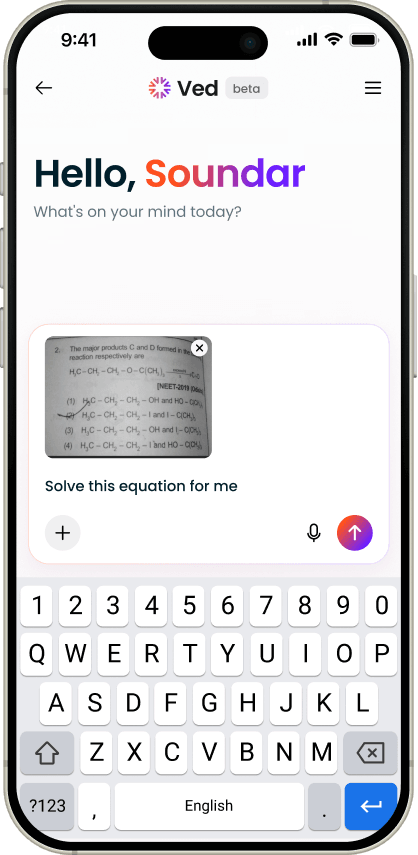
Screens · Library
Decision · a library that lives inside Ved, not beside it
The problem :
Students said it plainly: they couldn't get the content again. Everything Ved made scrolled away inside a conversation, so they re-asked for it - filling the product with duplicate work and leaving students without things they already owned.
What I did :
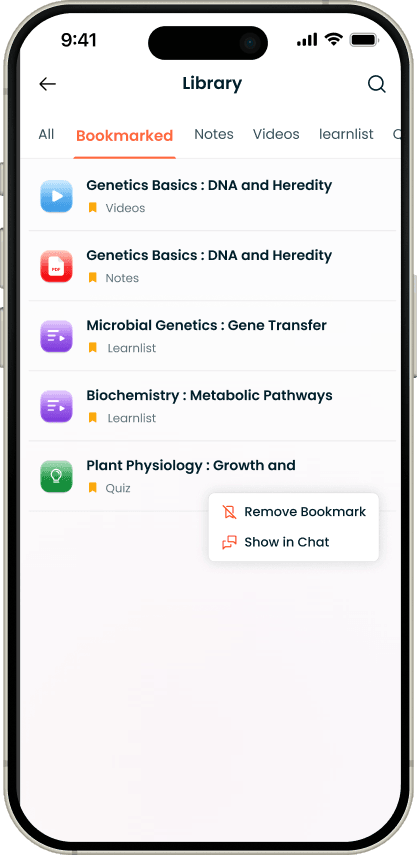
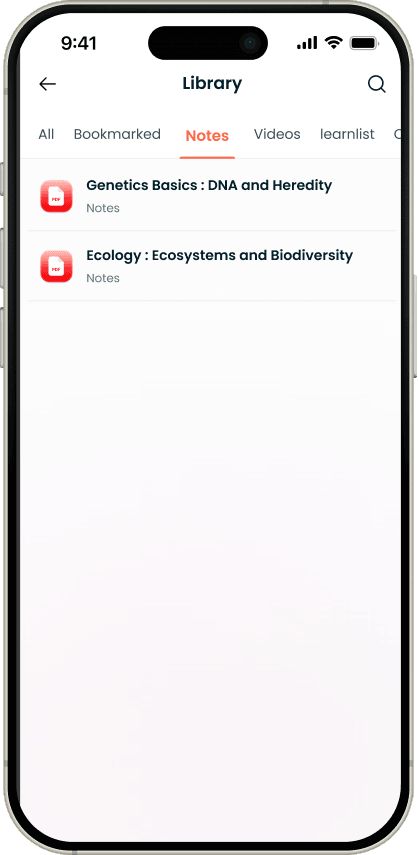
Everything Ved makes now saves automatically, sorted by what it is - notes, assignments, videos, playlists - with search across all of it. Bookmarking sits on top as the student's own shortlist, because a library that grows for a year has the same findability problem again unless they can pin what matters. Every saved item has Show in Chat, and when the student lands back in that conversation the card itself is highlighted, so they don't have to work out which of six cards they came for.
Why it was right :
Keeping it inside the product rather than pushing students to a downloads folder means they never leave to find their own work, and they can walk back into the context that made it. One change solving a student problem and a system problem at once.
The library on web
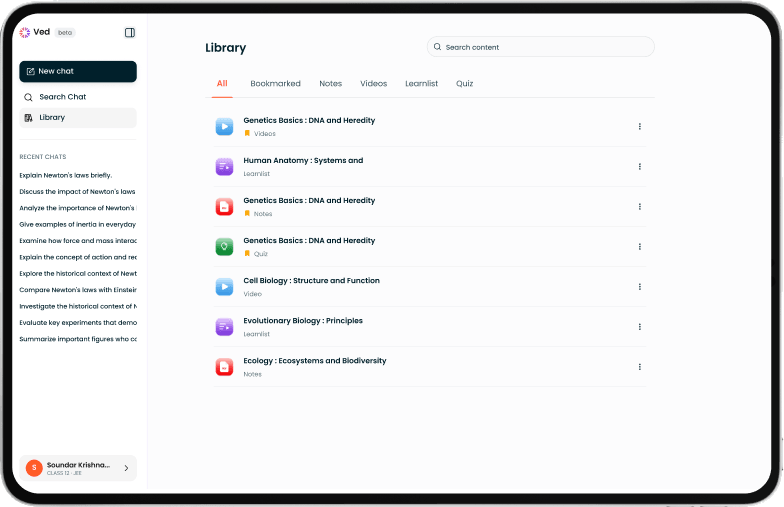
Content By Filters
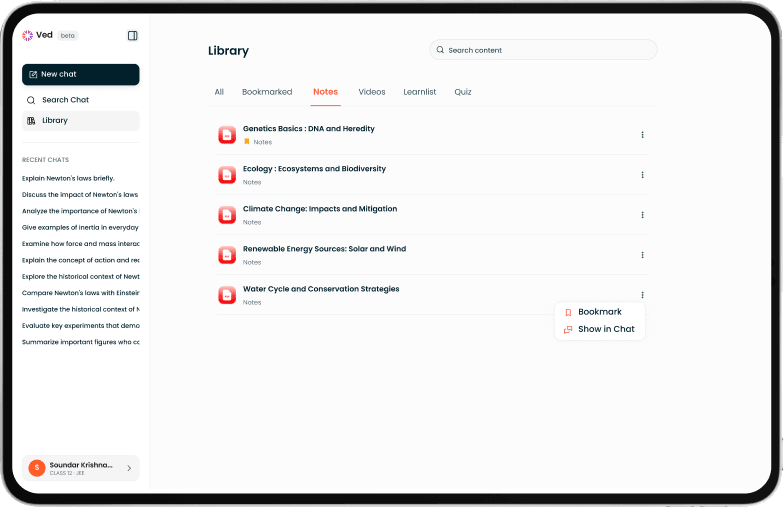
Library
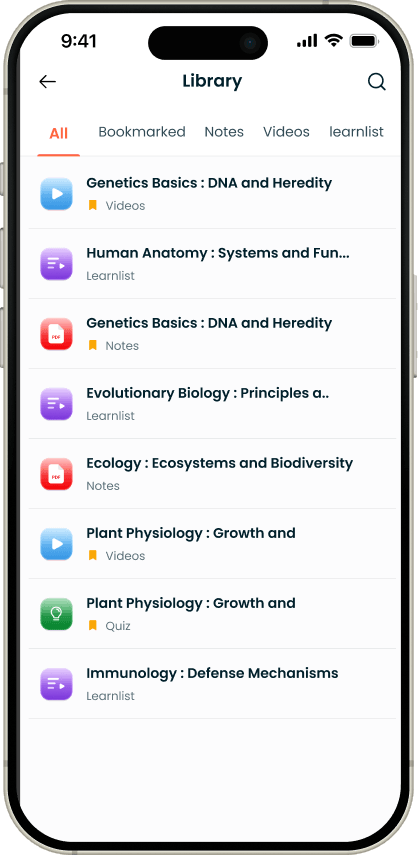
the student's own shortlist
Content - Filter
Conversations you can get back to
The library solved the content problem. It didn't solve the thread problem: a student who worked through something good with Ved on Tuesday had no way back to it on Friday.
Screens · History & Pinning
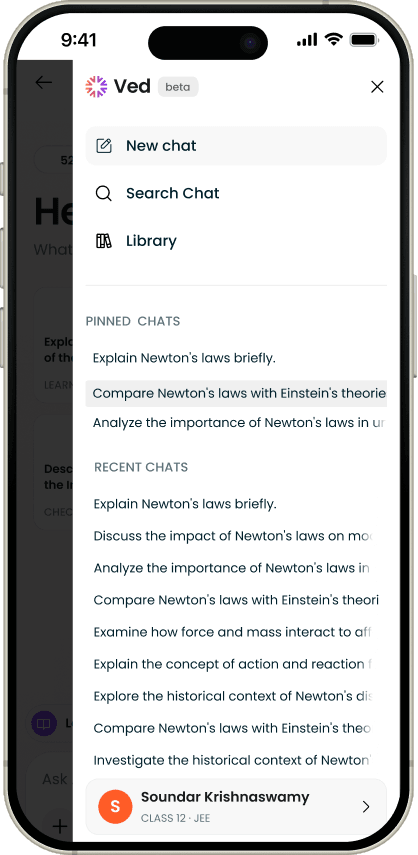
Decision · history, search and pinning in one panel
The problem :
Every conversation was disposable. Nothing accumulated, nothing could be returned to, and the only way back to a good explanation was to ask for it again - the same behaviour that was filling the logs with duplicates.
What I did :
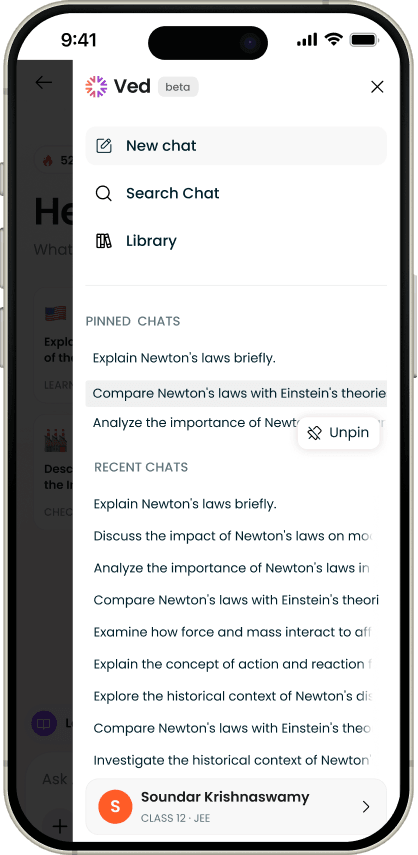
One panel holding New chat, Search Chat and Library, with recent conversations listed under them and pinning available on any of them. Pinned chats sit in their own section above recent ones, and Unpin appears in the same place Pin did. The student's own profile sits at the bottom - name, class and target exam - so what Ved is answering as is always visible rather than buried in settings.
Why it was right :
Recent history is automatic and costs the student nothing; pinning is manual and costs one tap. Together they cover both cases - the thread you half-remember, and the one you know you'll need again the week before the exam. And search matters more here than anywhere: a student who has used Ved for a year has hundreds of threads, and scrolling is not a retrieval system.
History
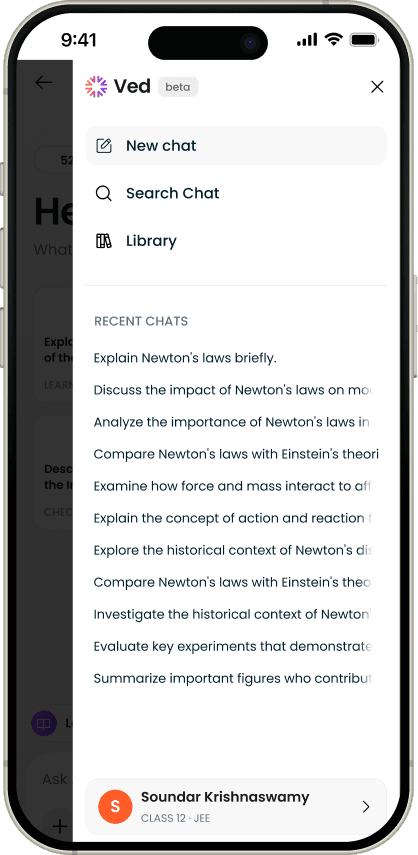
Pin-chat
Un Pin - chat
Screens · States
The four screens nobody screenshots
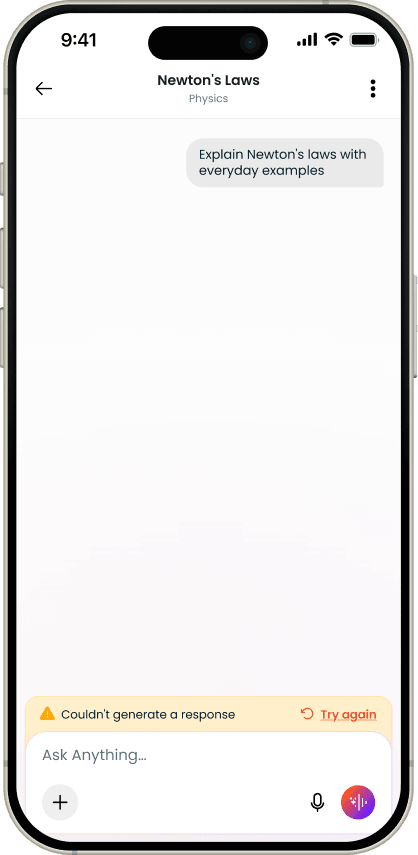
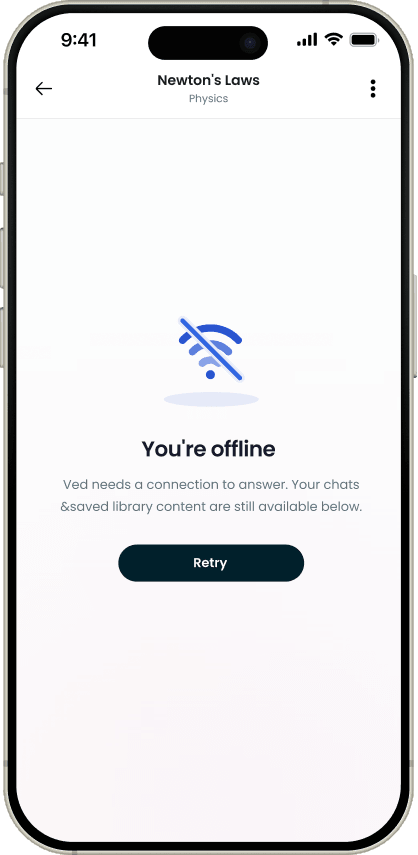
Empty and broken states are where a product either keeps a student or loses them, and they're the first thing that gets skipped. Ved is used at midnight on patchy mobile data, by someone who has a test in the morning - so these four got the same attention as the happy path.
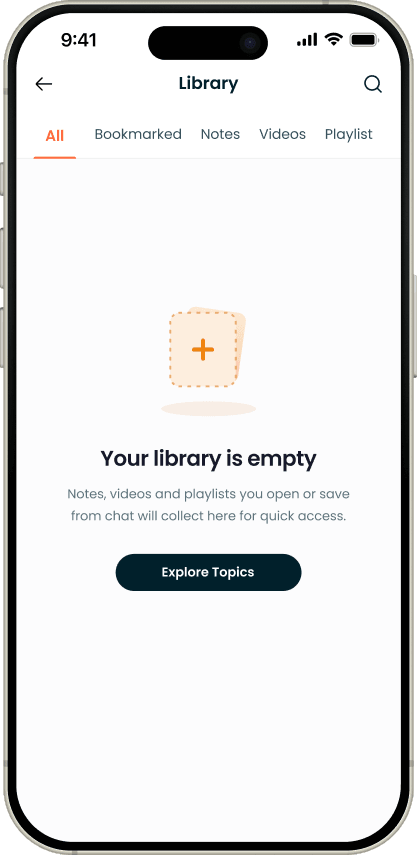
Each one does a job rather than apologising. The generation error offers the retry inline, without throwing away what's already on screen. The offline state says which side the problem is on, so the student doesn't blame their own answer. The empty library sends them somewhere to fill it. The empty bookmarks teach the gesture, because a feature nobody knows how to trigger is the same as a feature that doesn't exist - which is the lesson the whole rebuild came from.
Tech glitch
Offline - Broken Internet
Library Empty
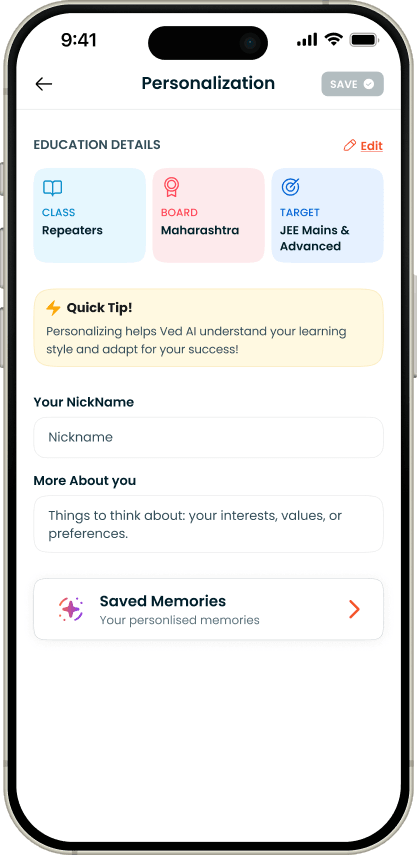
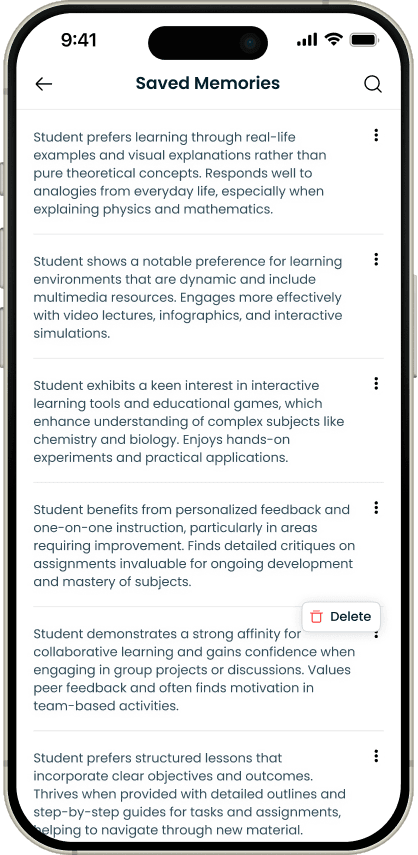
Memory, because the tenth visit looked like the first
With a typical conversation one message long, nothing in the product built up. A student's tenth session started exactly where their first had - a strange quality in something calling itself a mentor.
Ved now remembers on its own, and the student can add and remove what it keeps. Both halves matter. Automatic memory saves them repeating themselves; visible, editable memory means they always know what it's holding.
Screens · Content
Content that doesn't cost you your place
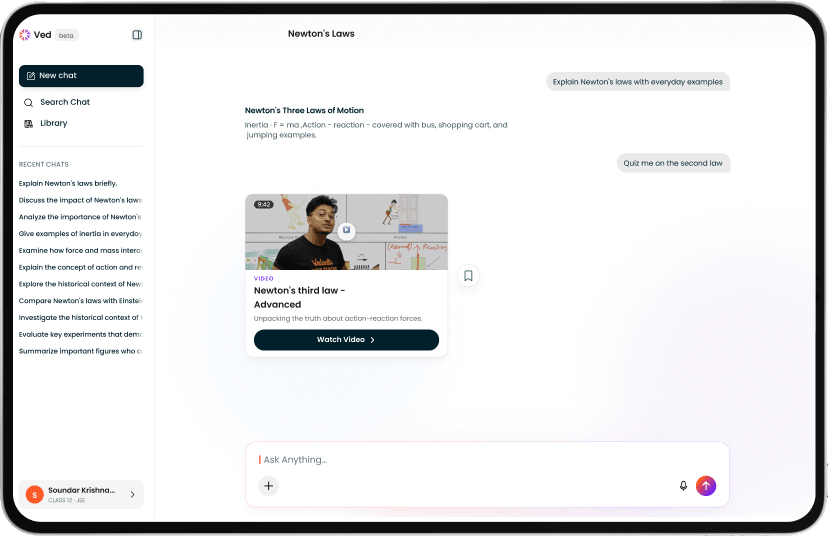
In the first version, opening a chapter page took the student to a new screen. On a phone that's the only sensible option. On the web it isn't, and a full page change meant losing the conversation you were in the middle of.
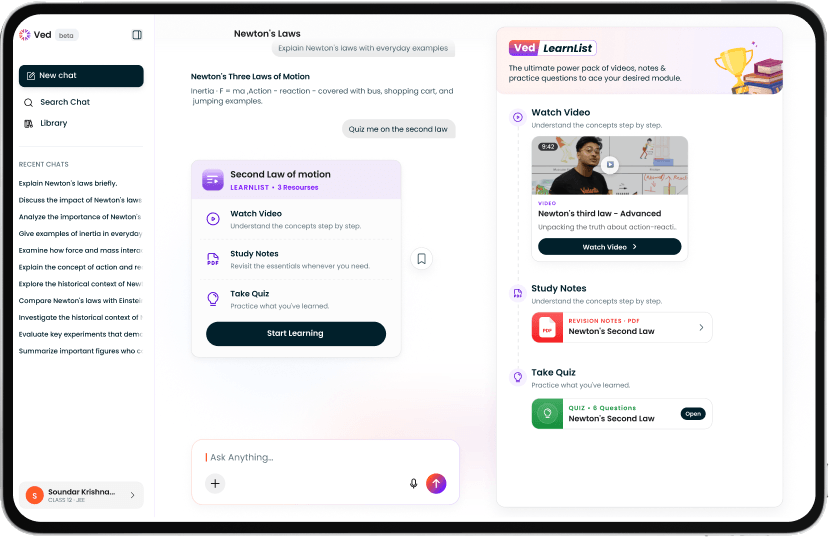
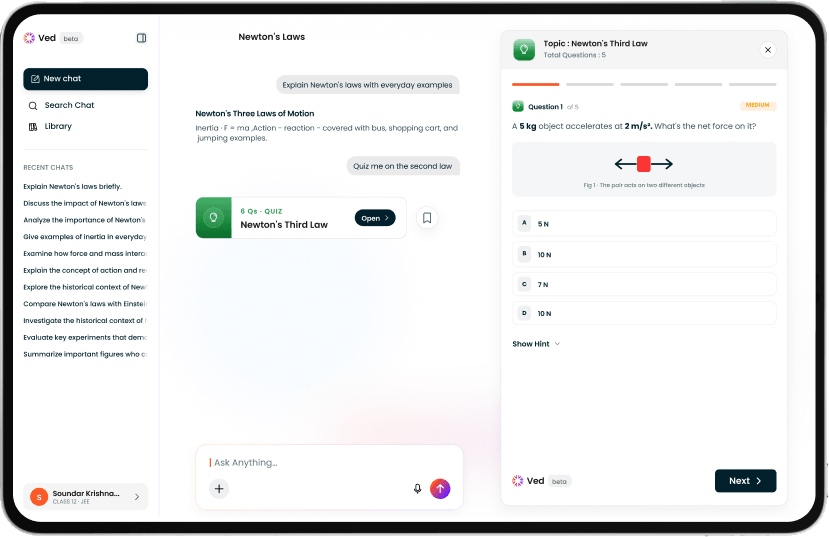
The second version brought all content into a side panel on the web. Same reasoning both times, two different answers: never make a student lose their place to look at something.
Content in Chat - Video
Content in Chat - Notes
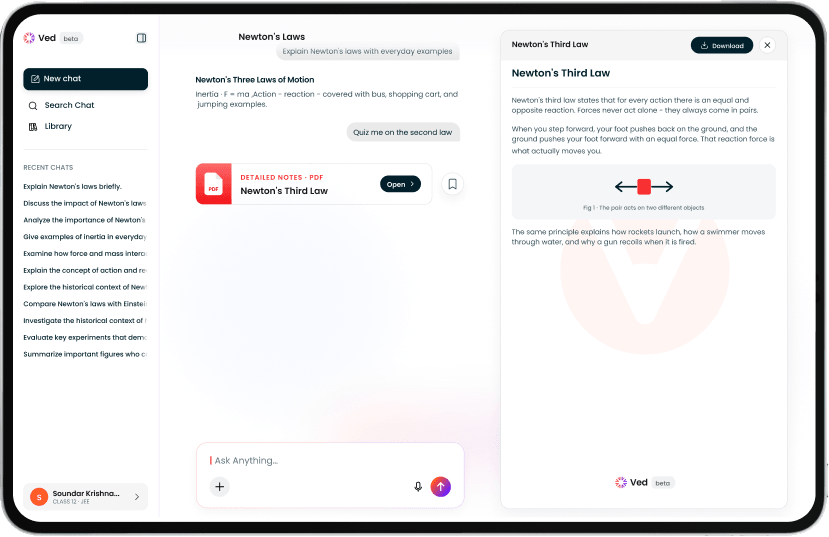
Content in Chat - Learnlist
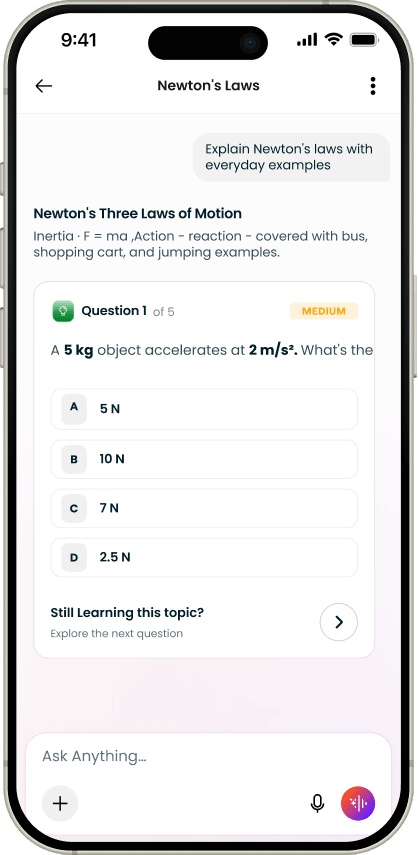
Content in Chat - Quiz
Videos
Notes
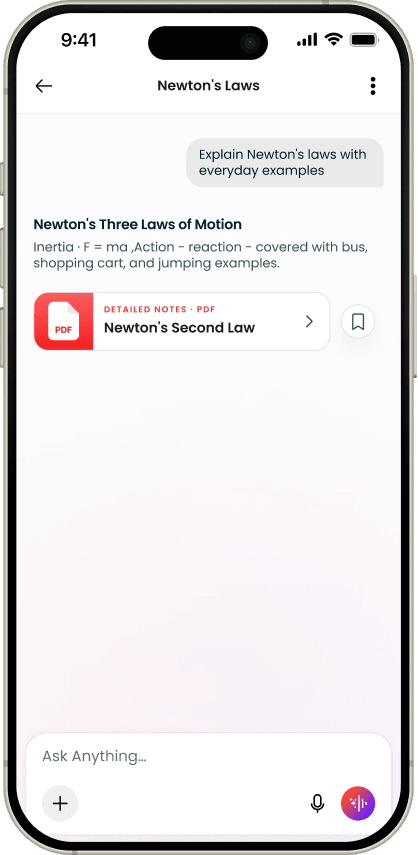
Learnlist
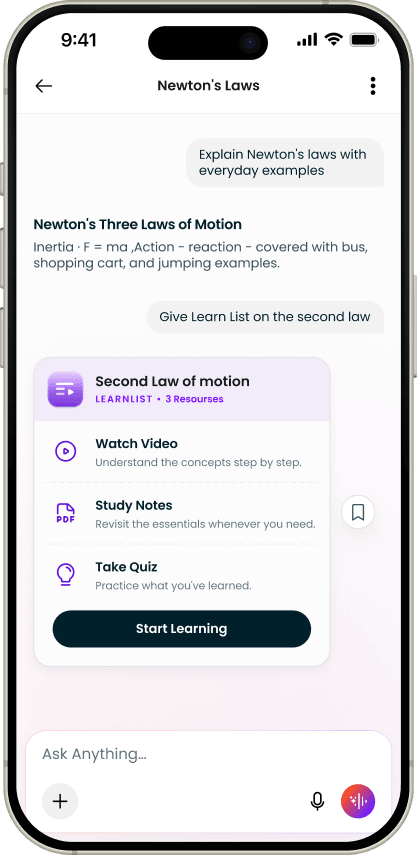
Quiz
Screens · Voice
Decision · same feedback control, different moment
Two findings pointed the same way. Use peaks late at night, on a phone. And a large share of students write in Hindi or a regional language, where typing means switching keyboards or spelling their language out in English letters - friction that speaking removes entirely.
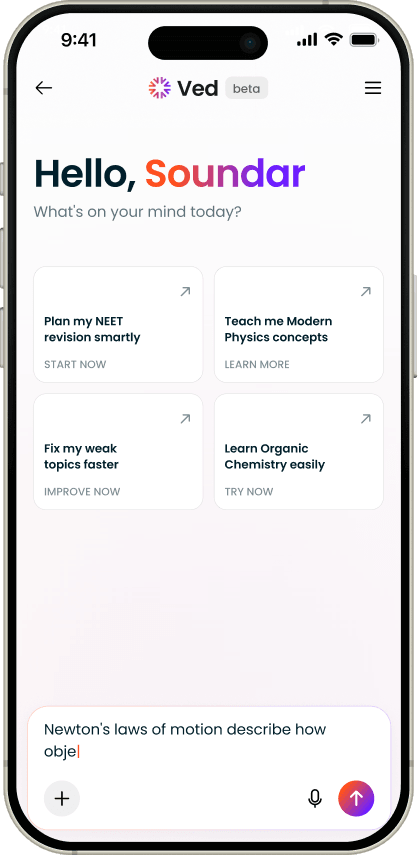
Voice exists in two forms, and they aren't the same decision. The microphone in the chat box is a shortcut: speak instead of type, get an ordinary reply. Live mode is a continuous spoken conversation with its own states.
The problem :
Students switch between talking and typing constantly - a formula is easier to type, a confusion is easier to speak. A voice mode you have to exit and restart punishes that, so people stop entering it at all.
What I did :
Three visible states so the student always knows where they are - listening, thinking, speaking - and a keyboard control inside the session. Dropping to typing keeps the transcript and the thread; only the input changes.
Why it was right :
It makes voice a way of talking to Ved rather than a separate place to go. And for a student writing in Hindi or a regional language, it removes the slowest part of asking.
Greeting
Listening
Dropping to the keyboard
Screens · Quiz
Testing yourself without leaving the conversation
The largest single thing students asked for was help with tests and scores. In the first version that meant being sent somewhere - a test series, a practice paper, another product.
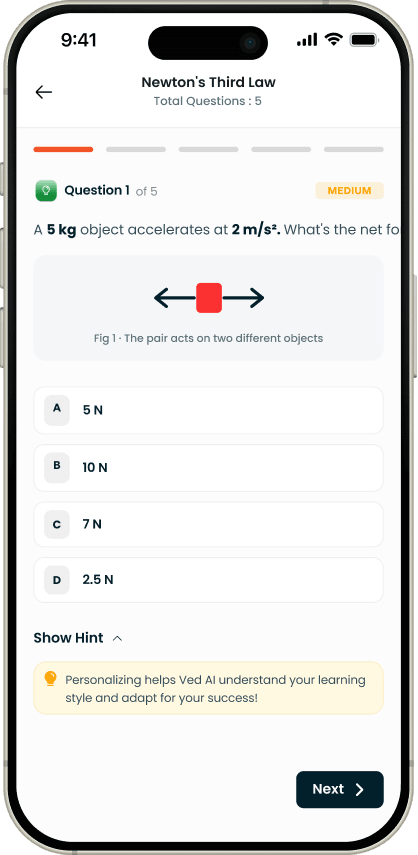
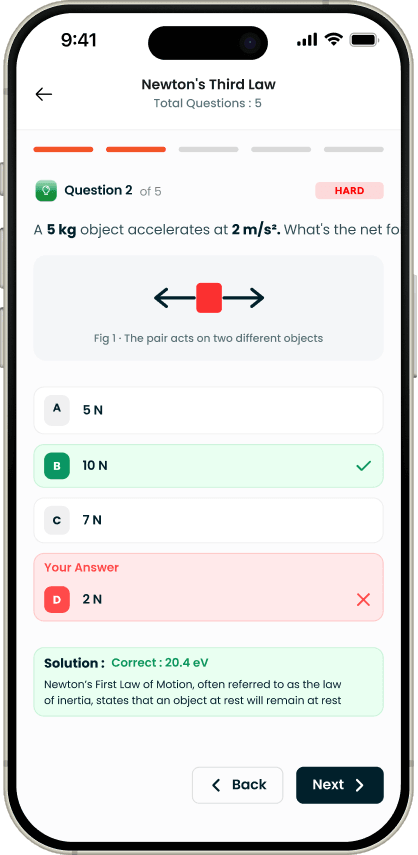
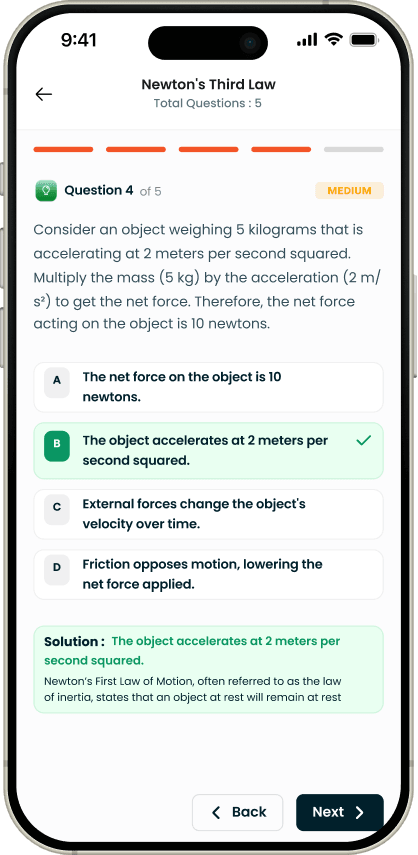
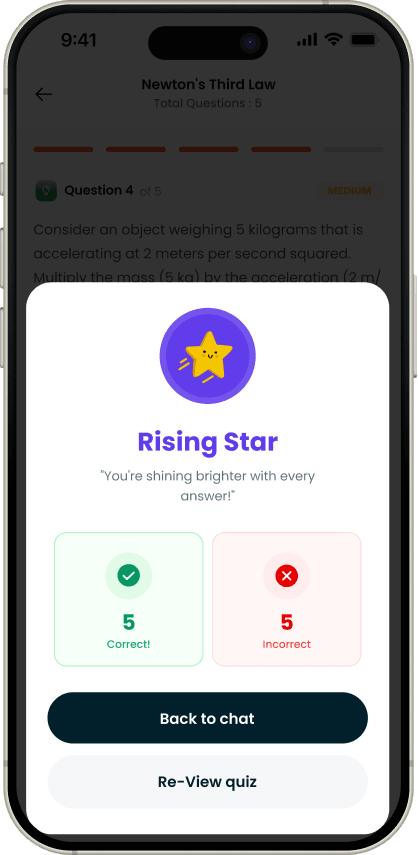
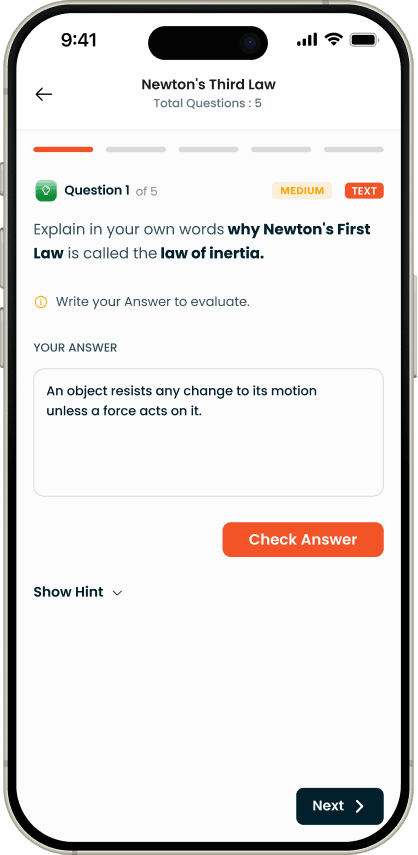
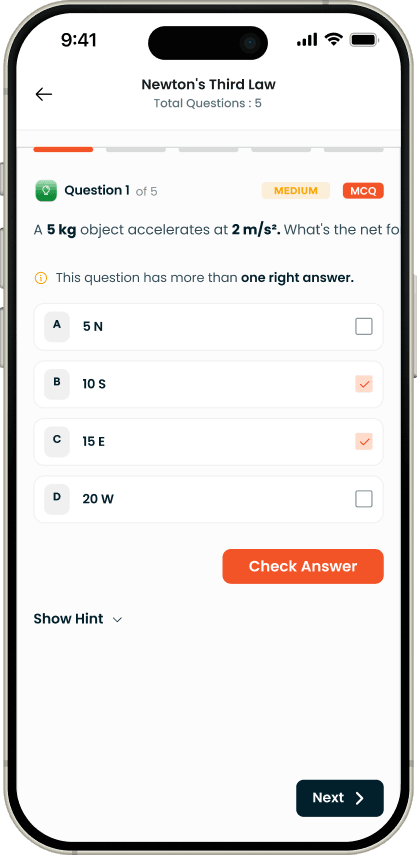
Now quiz me on the second law is a sentence Ved can act on. It builds the questions from the same syllabus data the rest of the product runs on, marks each answer as it's given, explains the ones that went wrong, and closes with a summary of what to revise. The whole thing happens inside the thread that raised the topic.
Quiz
Wrong Answer
A question, answered
The summary at the end
Text Answer
MCQ Questions
Numeric Questions
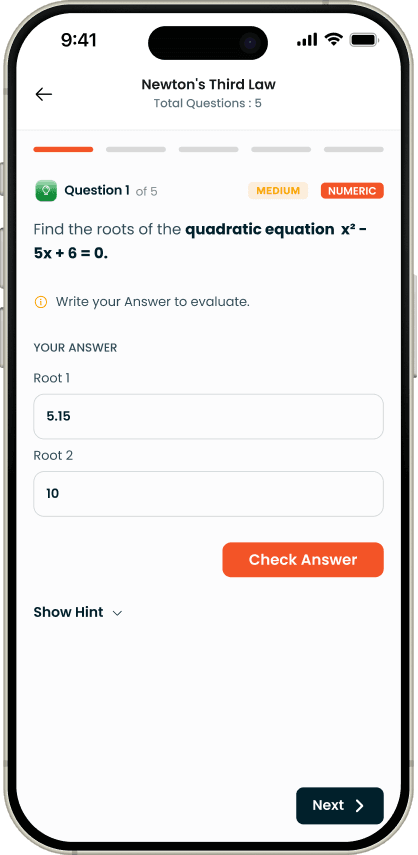
Numeric Questions
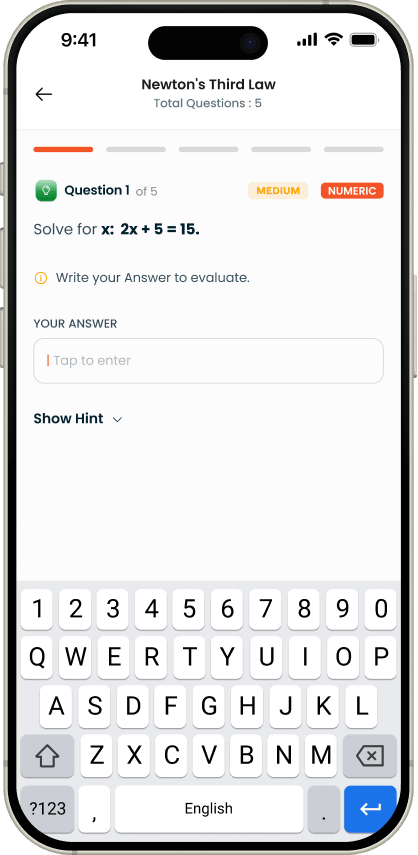
Screens · Feedback
Decision · same feedback control, different moment
The problem :
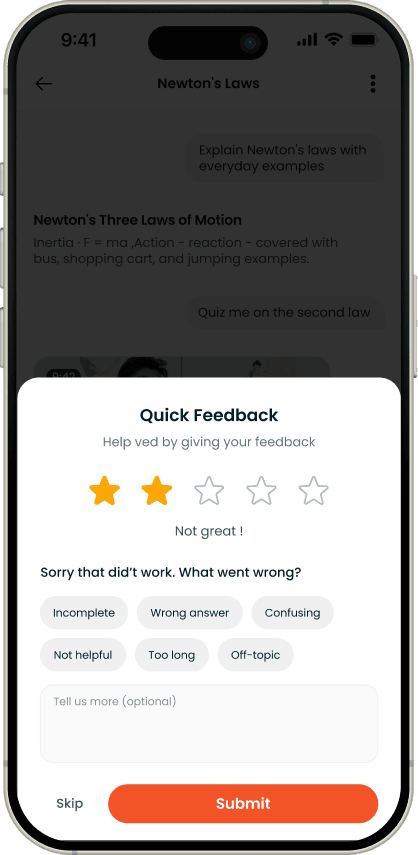
The first version put a thumbs up and thumbs down under every single message. It felt thorough and it was wrong twice over. It pressured students, asking for a verdict under every reply while they were mid-problem. And it produced poor data, because a student halfway through a question doesn't yet know whether Ved helped.
What I did :
Moved it to after the request is actually complete - the student has the notes, the solution, the answer. It arrives as one quiet inline line in the chat rather than a dialog over the screen, so it never blocks anyone and can simply be scrolled past. A low rating opens the only question worth asking at that point - what went wrong - as a short set of named reasons: incomplete, wrong answer, confusing, not helpful, too long, off-topic. Free text is there and optional; Skip sits next to Submit.
Why it was right :
Fewer ratings, better ones. At that moment the student actually knows the answer to the question being asked, which is the only condition under which feedback is worth collecting. And the named reasons turn a one-star rating into something the team can act on - "too long" and "wrong answer" are different bugs with different owners.
Feedback
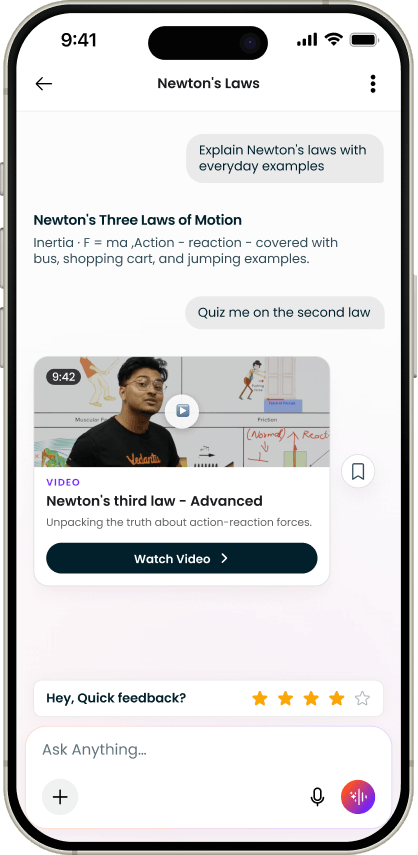
Feedback - High Rating
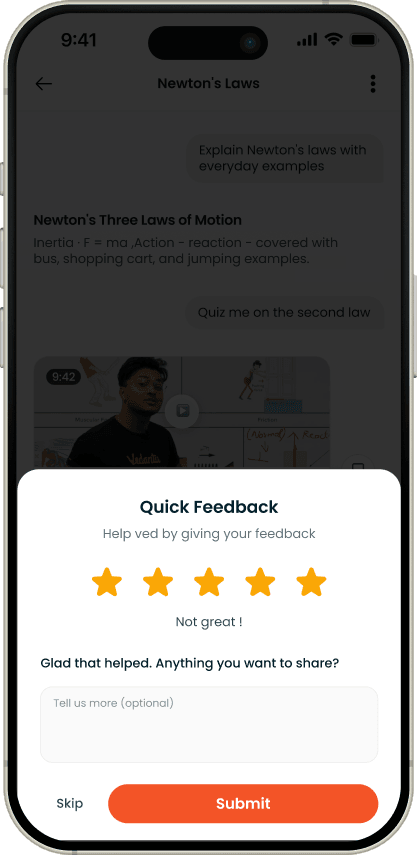
Feedback - Low Rating
Features
Ved stopped being aplace you go
The last move was leadership's: give the four capabilities names, so a student can point at them instead of guessing them into existence. The naming wasn't mine. Making each one a real thing, in the place the student already is, was.
Because once a capability had an identity, it could leave the chat entirely. Ved isn't a product sitting next to Vedantu's other products. It runs inside them.

LectureLens
WAVE, the live-class platform
ScoreBooster
Test report right after the test
InstaSolve
Doubt solving with experts
InstaSolve
watch, read, test yourself
LectureLens
WAVE, the live-class platform
ScoreBooster
Test report right after the test
InstaSolve
Doubt solving with experts
InstaSolve
watch, read, test yourself
The same student profile, the same syllabus knowledge, the same memory - reached from wherever the student happens to be. A student in a live class doesn't open Ved. Ved is already in the class.
This is also the part a general assistant structurally cannot do. It can't sit inside a live class, read a test report, or reach a question bank it doesn't have.
LectureLens
WAVE is Vedantu's live and recorded class platform. One teacher, hundreds of students, and doubts arriving from all of them at once. The teacher answers one at a time. Everyone else waits, and a waiting student stops watching.
LectureLens sits under the player: notes for the class, a quiz, tests, jump points for every topic covered - and doubt-asking built into the session itself.
Decision · a doubt is anchored to a moment, not a topic
The problem :
The hardest thing to describe when you're lost in a lecture is where you got lost. Asking a student to type that out is asking them to solve the problem before they can report it.
What I did :
A doubt asked at 06:42 captures the frame at 06:42 automatically and carries it into the thread. The doubt isn't "about Newton's second law" - it's about the exact instant the thread broke.
Why it was right :
It removes the describing entirely, and it makes the doubt legible to everyone who reads it later, because the moment travels with it.
Decision · doubts are public by default
The problem :
One teacher cannot answer three hundred students at once. Private doubts meant the same question answered thirty times, a teacher permanently behind, and students waiting through the part of the class they'd come for.
What I did :
Every doubt in the class is visible to everyone, with a filter for the student's own. Replies stack in order: Ved within a minute, the class teacher when they reach it, and other students alongside. Ved is tagged like a person - @Ved pulls it into a thread.
Why it was right :
The teacher answers once instead of thirty times, duplicates collapse, and a student learns from the questions they never thought to ask. That last part is the sharpest answer we found to the one-message finding - in a live class, a student doesn't have to think of the question. They can see it.
ScoreBooster
A score report tells a student what happened. It rarely tells them what to do. ScoreBooster lives inside the report itself, so the moment a student sees where the marks went, the way to fix it is in the same place - no separate product, no second search.
It reads the test: what was scored, which questions went wrong, which topics are weak, and what to work through next to move up.
Decision · honest about the score, never finished with the student
The problem :
A student planning around flattery is worse off than one who was told the truth. But a sixteen-year-old who reads that they're far off their target rank, and nothing else, closes the app.
What I did :
The honesty and the way forward always arrive together. Weak areas are named plainly and rank is stated realistically, but never on their own - each comes attached to the specific questions and topics that move it.
Why it was right :
Either half alone fails. Flattery makes the product useless; bare honesty makes it something students avoid opening after a bad test.
InstaSolve
Typing a physics problem with three subscripts and a diagram is worse than being stuck. So the student photographs the question and gets it worked through step by step, with the concept behind each step and the resources that go with it - the notes for that topic, the video, similar questions from past papers.
Doubt experts are still there, and connecting to one stays the headline path. InstaSolve doesn't replace that; it means a student isn't sitting on their hands while they wait, and it handles the cases where a full expert session was never needed.
Decision · suggested follow-ups instead of an empty input box
The problem :
A student who is stuck often can't articulate what they're missing. That's what being stuck is. An empty "ask a follow-up" box asks them to do the one thing they can't do yet.
What I did :
Every solution ends with three or four tappable follow-ups written from the shape of the original question - the next thing a confused student usually needs, offered rather than requested.
Why it was right :
It turns a single solution into a session the student can keep pulling on until it clicks - and it was already the shape of the answer to the one-message finding, before we had the data to name it.
LearnList
The chapter path from the first version, now something a student can reach for by name instead of stumbling into. Watch the video, read the notes, test yourself - matched to your class, your board and your language, and short enough to finish a topic in one sitting.
Learnings
What being wrongtaught me
The most useful outcome of this project was a wrong assumption, caught early and cheaply. The team believed placement explained the difference in completion, and that belief was supported by six months of real data. It was still wrong, and it was only visibly wrong because I framed the test so that our own position could lose.
The design lesson underneath it is narrower and more useful than "test your assumptions". Both versions asked for the same information. The version that won asked for it in more screens. What changed was not the amount of work, but how legible that work was: one decision per screen, a progress bar that ran to the end rather than resetting, and no screen that asked a student to hold two unrelated questions in their head at once. Length is felt as uncertainty, not as a count of steps.
The second lesson is about where the work actually lives. The five screens took a fraction of the time that the paths around them did - returning users, accounts that already exist, expired codes, international numbers, people who close the flow halfway. The completion number is produced by that second set, and it is the part of a project that is easiest to leave until the end and hardest to retrofit.
The third is that a data problem dressed as a design problem stays solved only if the data problem is solved too. One shared record was the least visible decision in this project and the one that determines whether the flow is still unified two years from now.
What I'd do differently
Read the logs before redesigning, not after. The one-message finding sat in a dashboard for months before it changed anything. The evidence wasn't missing - the habit of looking was.
And I'd argue harder for research alongside the numbers. The most useful thing we learned that year didn't come from the dashboard. It came from a student saying they couldn't get their content again. A dozen more conversations like that would have found it a year earlier.
What's next
The version Ilet go of
Live mode was the start of something bigger than voice. A student pointing a camera at a problem and talking through it is a different kind of help than typing a question, and that work has become its own product, now in development.
I designed the first version of it, and I'd built enough to recognise when a better approach came along. Handing it on was the right call - what's being built is a stronger version of the idea than the one I started with.
Lets talk
I design the data layer, not just thescreens
Designing for AI products. Open to conversations about product design.